NCCL
NCCL 是 Nvidia Collective multi-GPU Communication Library 的简称,它是一个实现多 GPU 的 collective communication 通信库,Nvidia 做了很多优化,以在 PCIe、Nvlink、InfiniBand 上实现较高的通信速度。
关于 collective communication 以及对应的各种原语,可以参考 mpi > MPI Primitives 和 NVIDIA 的这个 slide,讲解非常详细1。
传统 Collective communication 假设通信节点组成的 topology 是一颗 fat tree,但是实际通信中的 topology 可能比较复杂,比如 NVIDIA 的 GPU 拓扑关系,因此一般采用 ring-base collective communication,可以参考 ring-all-reduce。
nccl-advanced nccl-tests nccl-sharp
Using NCCL
Creating a communicator
要使用 NCCL 进行通信,每个设备上都要有一个 NCCL Communicator object。属于同一个 Communicator 的各个设备具有相同的 ncclUniqueId 以及不同的 rank。
ncclGetUniqueId
Before calling
ncclCommInitRank(), you need to first create a unique object which will be used by all processes and threads to synchronize and understand they are part of the same communicator. This is done by calling thencclGetUniqueId()function.
The
ncclGetUniqueId()function returns an ID which has to be broadcast to all participating threads and processes using any CPU communication system, for example, passing the ID pointer to multiple threads, or broadcasting it to other processes using MPI or another parallel environment using, for example, sockets.
ncclCommInitRank
When creating a communicator, a unique rank between 0 and n-1 has to be assigned to each of the n CUDA devices which are part of the communicator. Using the same CUDA device multiple times as different ranks of the same NCCL communicator is not supported and may lead to hangs.
Given a static mapping of ranks to CUDA devices, the
ncclCommInitRank(),ncclCommInitRankConfig()andncclCommInitAll()functions will create communicator objects, each communicator object being associated to a fixed rank and CUDA device. Those objects will then be used to launch communication operations.
|
|
这个 API 用于在一个设备上初始化 Communicator object。在设置不同设备上的 communicator 时,这个 API 必须被不同的线程/进程调用。或者使用 ncclGroupStart/ncclGroupEnd 来通过一个线程/进程设置多个设备的 Communicator。
ncclCommInitAll
You can also call the
ncclCommInitAlloperation to createncommunicator objects at once within a single process. As it is limited to a single process, this function does not permit inter-node communication. ncclCommInitAll is equivalent to calling a combination ofncclGetUniqueIdandncclCommInitRank.
The following sample code is a simplified implementation of
ncclCommInitAll.
|
|
ncclCommFinalize
ncclCommFinalizewill transition a communicator from the ncclSuccess state to the ncclInProgress state, start completing all operations in the background and synchronize with other ranks which may be using resources for their communications with other ranks. All uncompleted operations and network-related resources associated to a communicator will be flushed and freed with ncclCommFinalize. Once all NCCL operations are complete, the communicator will transition to the ncclSuccess state. Users can query that state with ncclCommGetAsyncError. If a communicator is marked as nonblocking, this operation is nonblocking; otherwise, it is blocking.
ncclCommDestroy
Once a communicator has been finalized, the next step is to free all resources, including the communicator itself. Local resources associated to a communicator can be destroyed with
ncclCommDestroy. If the state of a communicator become ncclSuccess before calling ncclCommDestroy, ncclCommDestroy call will guarantee nonblocking; on the contrary, ncclCommDestroy might be blocked. In all cases, ncclCommDestroy call will free resources of the communicator and return, and the communicator should not longer be accessed after ncclCommDestroy returns.
Collective Operations
AllReduce
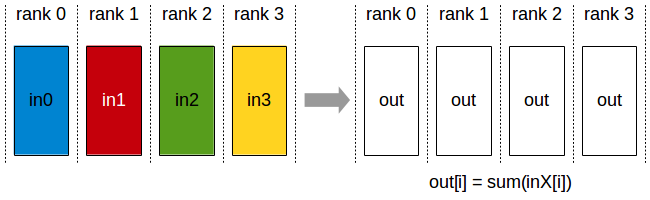
API 介绍可以参考 ncclAllRecuce()
|
|
Broadcast
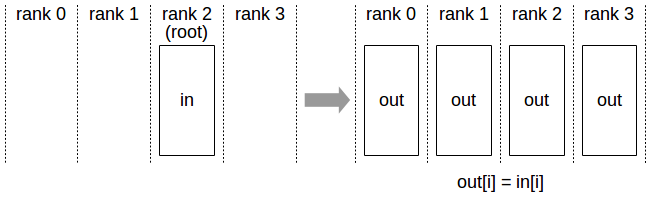
API 介绍可以参考 ncclBroadcast()
|
|
Reduce
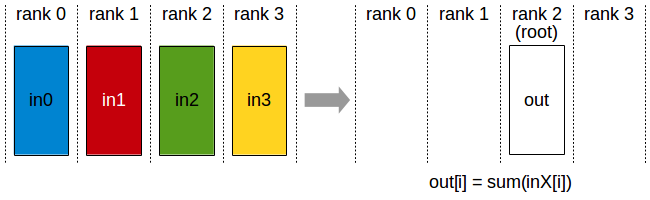
API 介绍可以参考 ncclRecuce()
|
|
AllGather
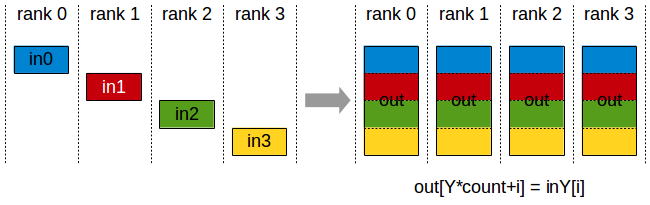
API 介绍可以参考 ncclAllGather()
|
|
ReduceScatter
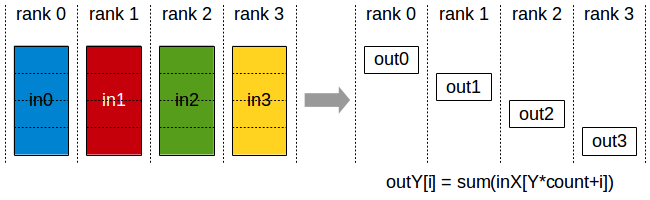
API 介绍可以参考 ncclRecuceScatter()
|
|
Group Calls
Group functions (ncclGroupStart/ncclGroupEnd) can be used to merge multiple calls into one. This is needed for three purposes:
- managing multiple GPUs from one thread (to avoid deadlocks)
- aggregating communication operations to improve performance
- merging multiple send/receive point-to-point operations (see Point-to-point communication section).
All three usages can be combined together, with one exception : calls to
ncclCommInitRank()cannot be merged with others.
Management Of Multiple GPUs From One Thread
|
|
Aggregated Operations (2.2 and later)
|
|
Point To Point Communication
SendRecv
|
|
One-to-All (Scatter)
|
|
All-to-one (Gather)
|
|
Neighbor exchange
|
|
NCCL Examples
See https://docs.nvidia.com/deeplearning/nccl/user-guide/docs/examples.html
Implementation
那么在以 GPU 为通信节点的场景下,怎么构建通信环呢?如下图所示:
单机 4 卡通过同一个 PCIe switch 挂载在一棵 CPU 的场景:
单机 8 卡通过两个 CPU 下不同的 PCIe switch 挂载的场景:
NCCL 实现成 CUDA C++ kernels,包含 3 种 primitive operations: Copy,Reduce,ReduceAndCopy。
下图所示,单机内多卡通过 PCIe 以及 CPU socket 通信,多机通过 InfiniBand 通信。
同样,在多机多卡内部,也要构成一个通信环。
下面是单机 4 卡(Maxwel GPU)上各个操作随着通信量增加的带宽速度变化,可以看到带宽上限能达到 10GB/s,接近 PCIe 的带宽。
下图是 Allreduce 在单机不同架构下的速度比较:
先不看 DGX-1 架构,这是 Nvidia 推出的深度学习平台,带宽能达到 60GB/s。前面三个是单机多卡典型的三种连接方式,第三种是四张卡都在一个 PCIe switch 上,所以带宽较高,能达到>10GB/s PCIe 的带宽大小,第二种是两个 GPU 通过 switch 相连后再经过 CPU 连接,速度会稍微低一点,第一种是两个 GPU 通过 CPU 然后通过 QPI 和另一个 CPU 上的两块卡相连,因此速度最慢,但也能达到>5GB/s。
下图是 Allreduce 多机下的速度表现,左图两机 8 卡,机内 PCIe,机间 InfiniBand 能达到>10GB/s 的速度,InfiniBand 基本上能达到机内的通信速度。
下图是 NCCL 在 CNTK ResNet50 上的 scalability,32 卡基本能达到线性加速比。
Benchmark
首先,在一台 K40 GPU 的机器上测试了 GPU 的连接拓扑,如下:
可以看到前四卡和后四卡分别通过不同的 CPU 组连接,GPU0 和 GPU1 直接通过 PCIe switch 相连,然后经过 CPU 与 GPU2 和 GPU3 相连。
下面是测试 PCIe 的带宽,可以看到 GPU0 和 GU1 通信能达到 10.59GB/s,GPU0 同 GPU2~3 通信由于要经过 CPU,速度稍慢,和 GPU4~7 的通信需要经过 QPI,所以又慢了一点,但也能达到 9.15GB/s。
而通过 NVlink 连接的 GPU 通信速度能达到 35GB/s:
NCCL 在不同的深度学习框架(CNTK/Tensorflow/Torch/Theano/Caffe)中,由于不同的模型大小,计算的 batch size 大小,会有不同的表现。比如上图中 CNTK 中 Resnet50 能达到 32 卡线性加速比,Facebook 之前能一小时训练出 ImageNet,而在 NMT 任务中,可能不会有这么大的加速比。因为影响并行计算效率的因素主要有并行任务数、每个任务的计算量以及通信时间。我们不仅要看绝对的通信量,也要看通信和计算能不能同时进行以及计算/通信比,如果通信占计算的比重越小,那么并行计算的任务会越高效。NMT 模型一般较大,多大几十 M 上百 M,不像现在 image 的模型能做到几 M 大小,通信所占比重会较高。
下面是 NMT 模型单机多卡加速的一个简单对比图:
以上就是对 NCCL 的一些理解,很多资料也是来自于 NCCL 的官方文档,欢迎交流讨论。
参考资料
-
No backlinks found.