原生的 k8s 基于 Device PluginExtended Resource 机制实现了在容器中使用 GPU,但是只支持 GPU 的独占使用,不允许在 Pod 间共享 GPU,这大大降低了对集群中 GPU 的利用率。为了在集群层面共享 GPU,我们需要实现 GPU 资源的隔离与调度,本文将依次介绍阿里的 GPUShare 与腾讯的 GPUManager,分析其实现机制。

阿里 GPUShare

阿里的 GPUShare 基于 Nvidia Docker2 和他们的 gpu sharing design 设计而实现的,为了使用阿里的 GPUShare,首先需要配置 Node 上的 Docker Runtime 并安装 NVIDIA Docker 2,具体过程可以参考 在 Docker 中使用 GPU

架构设计

假设条件

  • 尽管 GPU 可以从 CUDA Cores 和 GPU Memory 两个维度来衡量 GPU 的能力,在推理的场景,我们可以假定 CUDA core 的数量和 GPU Memory 的大小是成比例的
  • 在模型开发和推理的场景下,用户申请的 GPU 资源不超过 1 个 GPU,也就是说 resource limit 是 一个 GPU
  • 每个 Node 上所有卡的 GPU Memory 相同,这样可以通过 gpuTotalMemorygpuTotalCount 算出 Node 上每张卡的 GPU Memory

设计原则

  • 设计里定义了两种 Extended Resource

    • aliyun.com/gpu-mem: 单位从 number of GPUs 变更为 amount of GPU memory in MiB,如果一个 Node 有多个 GPU 设备,这里计算的是总的 GPU Memory
    • aliyun.com/gpu-count:对应于 Node 上的 GPU 设备的数目
  • 基于 k8s 原生的 Scheduler Extender、Extended Resource、DevicePlugin 机制来实现

  • 这个方案只实现 GPU 的共享,不实现算力和显存的隔离,如果想实现隔离,在阿里云可以搭配 cGPU 一起使用

核心组件

下图是整个设计的核心组件:

  • GPU Share Scheduler Extender:基于 k8s scheduler extender 机制,作用于调度过程的 FilterBind阶段,用于决定某个 Node 上的一个 GPU 设备是否可以提供足够的 GPU Memory,并将 GPU 分配的结果记录到 Pod Spec 的 Annotation 中
  • GPU Share Device Plugin:基于 k8s device plugin 机制,根据 GPU Share Scheduler Extender 记录在 Pod Spec 的 Annotation,实现 GPU 设备的 Allocation。

GPU Share Design
GPU Share Design

具体过程

设备资源报告

GPU Share Device Plugin 基于 nvml 库来查询每个 Node 上 GPU 设备的数目和每个 GPU 设备的 GPU Memory。

这些资源状况被通过 ListAndWatch() 汇报给 Kubelet,然后 kubelet 会上报给 APIServer,这时候执行 kubectl get node 可以看到在 status 看到相关的 Extended Resource字段:

 1
 2
 3
 4
 5
 6
 7
 8
 9
10
11
12
13
14
15
16
17
18
19
20
21
22
23
24
25
26
27
28
29
30
apiVersion: v1
kind: Node
metadata:
  name: 10.0.0.4
  labels:
    gpushare: "true"
    ...
spec:
  podCIDR: 172.16.1.0/26
  podCIDRs:
  - 172.16.1.0/26
  providerID: qcloud:///800002/ins-hsmsc4x9
status:
  ...
  allocatable:
    aliyun.com/gpu-count: "1"
    aliyun.com/gpu-mem: "22"
    cpu: 5926m
    ephemeral-storage: "47438316671"
    hugepages-2Mi: "0"
    memory: 54222084Ki
    ...
  capacity:
    aliyun.com/gpu-count: "1"
    aliyun.com/gpu-mem: "22"
    cpu: "6"
    ephemeral-storage: 51473868Ki
    hugepages-2Mi: "0"
    memory: 57448708Ki
    ...

调度插件扩展

用户申请 GPU 的时候,在 Extended Resource 中只填写 gpu-mem,下面部署一个单机版的 Tensorflow:

 1
 2
 3
 4
 5
 6
 7
 8
 9
10
11
12
13
14
15
16
17
18
19
20
21
22
23
24
25
26
27
28
29
30
31
32
33
34
35
36
37
38
39
40
41
42
apiVersion: apps/v1
kind: Deployment
metadata:
  name: tensorflow
  labels:
    k8s-app: tensorflow
spec:
  replicas: 1
  selector:
    matchLabels:
      k8s-app: tensorflow
  template:
    metadata:
      labels:
        k8s-app: tensorflow
    spec:
      containers:
      - name: tensorflow
        image: tensorflow/tensorflow:2.2.1-gpu-py3-jupyter
        ports:
        - containerPort: 8888
        resources:
          limits:
            cpu: 4
            memory: 2Gi
            aliyun.com/gpu-mem: 3
          requests:
            cpu: 2
            memory: 1Gi
---
apiVersion: v1
kind: Service
metadata:
    name: jupyter-service
spec:
  type: NodePort
  ports:
  - port: 80
    targetPort: 8888
    name: tensorflow
  selector:
    k8s-app: tensorflow
Filter

当 kube-scheduler 运行完所有的 Filter 函数后,就会调用 GPU Share Extender 的 Filter 函数。在原生的过滤中,kube-scheduler 会计算是否有足够的 Extended Resource(算的是总共的 GPU Memory),但是不能知道是否某个 GPU 设备有足够的资源,这时候就需要调度器插件来实现。以下图为例:

  • 用户申请了 8138MiB 的 GPU Memory,对于原生调度器,N1 节点只剩下 (16276 * 2 - 16276 - 12207 = 4069) 的 GPU 资源,不满足 Extended Resource 可用的条件,N1 节点被过滤掉
  • 接下来的 N2 节点和 N3 节点剩余的总的资源数都有 8138MiB,那么该选择哪一个呢
  • GPU Share Extender 的过滤中,他需要找到有单个 GPU 能够满足用户申请的资源,当检查到 N2 节点的时候,发现虽然总的 GPU Memory 有 8138MiB,但是每个 GPU 设备都只剩 4096MiB 了,不能满足单设备 8138 的需求,所以 N2 被过滤掉
  • 扫描到 N3 节点,发现 GPU0 满足 8138MiB 的需求,符合要求

我们看一下 Extender 在 Filter 阶段执行的函数,对于要创建的 Pod,当前 Node 检查自己拥有的所有可用 GPU,一旦有一个 GPU 的可用显存大于申请的显存,那么当前 Node 是可以被调度的。

 1
 2
 3
 4
 5
 6
 7
 8
 9
10
11
12
13
14
15
16
17
18
19
20
21
22
23
24
25
// check if the pod can be allocated on the node
func (n *NodeInfo) Assume(pod *v1.Pod) (allocatable bool) {
	allocatable = false

	n.rwmu.RLock()
	defer n.rwmu.RUnlock()

	availableGPUs := n.getAvailableGPUs()
	reqGPU := uint(utils.GetGPUMemoryFromPodResource(pod))
	log.Printf("debug: AvailableGPUs: %v in node %s", availableGPUs, n.name)

	if len(availableGPUs) > 0 {
		for devID := 0; devID < len(n.devs); devID++ {
			availableGPU, ok := availableGPUs[devID]
			if ok {
				if availableGPU >= reqGPU {
					allocatable = true
					break
				}
			}
		}
	}

	return allocatable
}

接下来的一个问题是,每个 Node 可用的 GPU 显存是如何得到的呢?我们进入到 getAvailableGPUs 继续看:

 1
 2
 3
 4
 5
 6
 7
 8
 9
10
11
12
13
14
15
16
17
18
19
func (n *NodeInfo) getAvailableGPUs() (availableGPUs map[int]uint) {
	allGPUs := n.getAllGPUs()
	usedGPUs := n.getUsedGPUs()
	unhealthyGPUs := n.getUnhealthyGPUs()
	availableGPUs = map[int]uint{}
	for id, totalGPUMem := range allGPUs {
		if usedGPUMem, found := usedGPUs[id]; found {
			availableGPUs[id] = totalGPUMem - usedGPUMem
		}
	}
	log.Printf("info: available GPU list %v before removing unhealty GPUs", availableGPUs)
	for id, _ := range unhealthyGPUs {
		log.Printf("info: delete dev %d from availble GPU list", id)
		delete(availableGPUs, id)
	}
	log.Printf("info: available GPU list %v after removing unhealty GPUs", availableGPUs)

	return availableGPUs
}

这里可以看到,Scheduler Extender 内部维护了当前 Node 上所有的 GPU 显存状态和已经用了的 GPU 显存状态信息:

 1
 2
 3
 4
 5
 6
 7
 8
 9
10
11
12
13
14
15
16
17
18
19
// device index: gpu memory
func (n *NodeInfo) getUsedGPUs() (usedGPUs map[int]uint) {
	usedGPUs = map[int]uint{}
	for _, dev := range n.devs {
		usedGPUs[dev.idx] = dev.GetUsedGPUMemory()
	}
	log.Printf("info: getUsedGPUs: %v in node %s, and devs %v", usedGPUs, n.name, n.devs)
	return usedGPUs
}

// device index: gpu memory
func (n *NodeInfo) getAllGPUs() (allGPUs map[int]uint) {
	allGPUs = map[int]uint{}
	for _, dev := range n.devs {
		allGPUs[dev.idx] = dev.totalGPUMem
	}
	log.Printf("info: getAllGPUs: %v in node %s, and dev %v", allGPUs, n.name, n.devs)
	return allGPUs
}

关于 GetUsedGPUMemory,是 Scheduler Extender 内部维护的 DeviceInfo 所记录的,这里的 d.podMap 会在每次 Extender 执行 Bind 的时候,将对应的 Pod 添加到对应的 Node 上的 DeviceInfo 中:

 1
 2
 3
 4
 5
 6
 7
 8
 9
10
11
12
13
14
func (d *DeviceInfo) GetUsedGPUMemory() (gpuMem uint) {
	log.Printf("debug: GetUsedGPUMemory() podMap %v, and its address is %p", d.podMap, d)
	d.rwmu.RLock()
	defer d.rwmu.RUnlock()
	for _, pod := range d.podMap {
		if pod.Status.Phase == v1.PodSucceeded || pod.Status.Phase == v1.PodFailed {
			log.Printf("debug: skip the pod %s in ns %s due to its status is %s", pod.Name, pod.Namespace, pod.Status.Phase)
			continue
		}
		// gpuMem += utils.GetGPUMemoryFromPodEnv(pod)
		gpuMem += utils.GetGPUMemoryFromPodAnnotation(pod)
	}
	return gpuMem
}

再总结总结,本质上是 Scheduler Extender 维护了一个 devs 这么一个数据结构,使得它可以知道当前 Node 上每个 GPU 设备的显存状态。

1
2
3
4
5
6
7
8
9
// NodeInfo is node level aggregated information.
type NodeInfo struct {
	name           string
	node           *v1.Node
	devs           map[int]*DeviceInfo
	gpuCount       int
	gpuTotalMemory int
	rwmu           *sync.RWMutex
}

那么问题来了,我们通过 ApiServer,只能知道对应 Node 上的 gpuCountgpuTotalMemory,而不知道每张卡各自的显存的。这个 devs 是怎么初始化得到每张卡的显存信息呢的呢?继续看代码:

 1
 2
 3
 4
 5
 6
 7
 8
 9
10
11
12
13
14
15
16
17
18
19
20
21
22
23
24
// Create Node Level
func NewNodeInfo(node *v1.Node) *NodeInfo {
	log.Printf("debug: NewNodeInfo() creates nodeInfo for %s", node.Name)

	devMap := map[int]*DeviceInfo{}
	for i := 0; i < utils.GetGPUCountInNode(node); i++ {
		devMap[i] = newDeviceInfo(i, uint(utils.GetTotalGPUMemory(node)/utils.GetGPUCountInNode(node)))
	}

	if len(devMap) == 0 {
		log.Printf("warn: node %s with nodeinfo %v has no devices",
			node.Name,
			node)
	}

	return &NodeInfo{
		name:           node.Name,
		node:           node,
		devs:           devMap,
		gpuCount:       utils.GetGPUCountInNode(node),
		gpuTotalMemory: utils.GetTotalGPUMemory(node),
		rwmu:           new(sync.RWMutex),
	}
}

可以看到,这里在初始化的时候,默认设定每张 GPU 卡的显存大小一样,通过平均得到每张卡的心存信息。

Bind
  • 当调度器发现有 Node 符合要求,这时候会把 Pod 和 Node Bind 到一起,GPU Share Extender 需要做两件事情:
    • 根据 binpack 原则找到 Node 上对应的 GPU 设备,并将 GPU Device ID 记录到 Pod 的 Annotation 中 ALIYUN_GPU_ID。他也会将 Pod 使用的 GPU Memory 记录到 Pod Annotation 中:ALIYUN_COM_GPU_MEM_PODALIYUN_COM_GPU_MEM_ASSUME_TIME
    • Bind the Node and Pod with kubernetes API
  • 如果没有找到合适的 Node 符合要求,那么就不会做 Bind 操作

以下图为例,N1 中有 4 个 GPU,其中 GPU0(12207),GPU1(8138)、GPU2(4069)和 GPU3(16276), GPU2 因为资源不够被过滤掉,剩下的 3 个 GPU 根据 Binpack 原则,我们选用 GPU1(图里面 Annotation 错了,不是 0,而是 1)

我们看一看在找 GPU 设备的时候是如何操作的,可以看到这里通过 candidateGPUMemory > availableGPU 这里实现了 binpack

 1
 2
 3
 4
 5
 6
 7
 8
 9
10
11
12
13
14
15
16
17
18
19
20
21
22
23
24
25
26
27
28
29
30
31
32
33
34
35
36
37
38
39
40
41
42
43
44
45
// allocate the GPU ID to the pod
func (n *NodeInfo) allocateGPUID(pod *v1.Pod) (candidateDevID int, found bool) {

	reqGPU := uint(0)
	found = false
	candidateDevID = -1
	candidateGPUMemory := uint(0)
	availableGPUs := n.getAvailableGPUs()

	reqGPU = uint(utils.GetGPUMemoryFromPodResource(pod))

	if reqGPU > uint(0) {
		log.Printf("info: reqGPU for pod %s in ns %s: %d", pod.Name, pod.Namespace, reqGPU)
		log.Printf("info: AvailableGPUs: %v in node %s", availableGPUs, n.name)
		if len(availableGPUs) > 0 {
			for devID := 0; devID < len(n.devs); devID++ {
				availableGPU, ok := availableGPUs[devID]
				if ok {
					if availableGPU >= reqGPU {
						if candidateDevID == -1 || candidateGPUMemory > availableGPU {
							candidateDevID = devID
							candidateGPUMemory = availableGPU
						}

						found = true
					}
				}
			}
		}

		if found {
			log.Printf("info: Find candidate dev id %d for pod %s in ns %s successfully.",
				candidateDevID,
				pod.Name,
				pod.Namespace)
		} else {
			log.Printf("warn: Failed to find available GPUs %d for the pod %s in the namespace %s",
				reqGPU,
				pod.Name,
				pod.Namespace)
		}
	}

	return candidateDevID, found
}

Kubelet 创建 Pod

接下来由 Kubelet 在创建 container 前调用 GPU Share Device PluginAllocate 函数,参数是申请的 GPU Memory 的数量。

Pod 运行成功后,执行 kubectl get pod 可以看到:

 1
 2
 3
 4
 5
 6
 7
 8
 9
10
apiVersion: v1
kind: Pod
metadata:
  annotations:
    ALIYUN_COM_GPU_MEM_ASSIGNED: "true"
    ALIYUN_COM_GPU_MEM_ASSUME_TIME: "1606125285243248618"
    ALIYUN_COM_GPU_MEM_DEV: "22"
    ALIYUN_COM_GPU_MEM_IDX: "0"
    ALIYUN_COM_GPU_MEM_POD: "3"
  ...
  • Device Plugin 从 k8s apiserver 拿到所有 Pending 的 Pod 中属于 GPU Share 的 Pod,并且按照 AssumedTimestamp 排序
  • 选择符合 Allocation 传入的 GPU Memory 的 Pod,如果有多个,选择最早的那个 Pod
  • 标记 ALIYUN_COM_GPU_MEM_ASSIGNED 为 True
  • 把 DeviceID 作为下 NVIDIA_VISIBLE_DEVICES 环境变量告诉 Nvidia Docker2,并且创建容器

这里问题是 device plugin 的 allocate 接口参数是什么,是否包含 pod 信息,是否包含 pod annotation?

查看 Device Plugin 的代码,这一个申请的 GPU Memory 的数量让我很疑惑,为何要这么算?

1
2
3
	for _, req := range reqs.ContainerRequests {
		podReqGPU += uint(len(req.DevicesIDs))
	}

继续看 Device PluginDeviceIDs 是如何生成的。这里调用了 nvml library 可以探测到本 Node 上拥有的 GPU 有多少个,每个显存是多少。接下来 Device Plugin 会创建一系列的 FakeDeviceID,并将这个 DeviceIDs 返回给 Kubelet,这就解释了为什么要通过上面的方法计算申请的 GPU Memory,这里的 Memory 以 MiB 为单位。

 1
 2
 3
 4
 5
 6
 7
 8
 9
10
11
12
13
14
15
16
17
18
19
20
21
22
23
24
25
26
27
28
29
30
31
32
33
34
35
36
37
func getDevices() ([]*pluginapi.Device, map[string]uint) {
	n, err := nvml.GetDeviceCount()
	check(err)

	var devs []*pluginapi.Device
	realDevNames := map[string]uint{}
	for i := uint(0); i < n; i++ {
		d, err := nvml.NewDevice(i)
		check(err)
		// realDevNames = append(realDevNames, d.UUID)
		var id uint
		log.Infof("Deivce %s's Path is %s", d.UUID, d.Path)
		_, err = fmt.Sscanf(d.Path, "/dev/nvidia%d", &id)
		check(err)
		realDevNames[d.UUID] = id
		// var KiB uint64 = 1024
		log.Infof("# device Memory: %d", uint(*d.Memory))
		if getGPUMemory() == uint(0) {
			setGPUMemory(uint(*d.Memory))
		}
		for j := uint(0); j < getGPUMemory(); j++ {
			fakeID := generateFakeDeviceID(d.UUID, j)
			if j == 0 {
				log.Infoln("# Add first device ID: " + fakeID)
			}
			if j == getGPUMemory()-1 {
				log.Infoln("# Add last device ID: " + fakeID)
			}
			devs = append(devs, &pluginapi.Device{
				ID:     fakeID,
				Health: pluginapi.Healthy,
			})
		}
	}

	return devs, realDevNames
}

我们看一下 Device Plugin 是如何找到对应的 Pod 的,可以看到一旦碰到有 Pod 申请的 GPU 显存与 Kubelet 传入的显存大小一致,那么则找到对应的 Pod 了。

 1
 2
 3
 4
 5
 6
 7
 8
 9
10
11
12
13
14
15
16
17
18
pods, err := getCandidatePods()
if err != nil {
   log.Infof("invalid allocation requst: Failed to find candidate pods due to %v", err)
   return buildErrResponse(reqs, podReqGPU), nil
}
...

for _, pod := range pods {
   if getGPUMemoryFromPodResource(pod) == podReqGPU {
      log.Infof("Found Assumed GPU shared Pod %s in ns %s with GPU Memory %d",
         pod.Name,
         pod.Namespace,
         podReqGPU)
      assumePod = pod
      found = true
      break
   }
}

这里的 getCandidatePods就是 List 所有 Pending 的 Pod 中 Assume Memory 的,并且按照时间排序:

 1
 2
 3
 4
 5
 6
 7
 8
 9
10
11
12
13
14
15
16
17
// pick up the gpushare pod with assigned status is false, and
func getCandidatePods() ([]*v1.Pod, error) {
	candidatePods := []*v1.Pod{}
	allPods, err := getPendingPodsInNode()
	if err != nil {
		return candidatePods, err
	}
	for _, pod := range allPods {
		current := pod
		if isGPUMemoryAssumedPod(&current) {
			candidatePods = append(candidatePods, &current)
		}
	}

  ...
	return makePodOrderdByAge(candidatePods), nil
}

那么这里有一个问题:如果在同一个 Node 有两个 Pod <PodA, PodB>,都申请了相同的 GPU 显存大小,比如 3G,那么 kubelet 是在创建容器的时候,是如何保证两个 Pod 不混淆的呢?混淆会有问题吗,kubelet 建 Pod 的时候到底是怎么搞的?是谁触发了 kubelet 创建容器?


腾讯 GPUManager

GPU Manager 提供一个 All-in-One 的 GPU 管理器,基于 Kubernetes DevicePlugin 插件系统实现,该管理器提供了分配并共享 GPU、GPU 指标查询、容器运行前的 GPU 相关设备准备等功能,支持用户在 Kubernetes 集群中使用 GPU 设备。

  • 拓扑分配:提供基于 GPU 拓扑分配功能,当用户分配超过 1 张 GPU 卡的应用,可以选择拓扑连接最快的方式分配 GPU 设备。
  • GPU 共享:允许用户提交小于 1 张卡资源的任务,并提供 QoS 保证。
  • 应用 GPU 指标的查询:用户可以访问主机端口(默认为 5678)的 /metrics 路径,可以为 Prometheus 提供 GPU 指标的收集功能,访问 /usage 路径可以进行可读性的容器状况查询。

架构设计

设计原则

  • 设计里定义了两种 Extended Resource

    • tencent.com/vcuda-corevcuda-core对应的是使用率,单张卡有 100 个 core
    • tencent.com/vcuda-memoryvcuda-memory 是显存,每个单位是 256MB 的显存
    • 如果申请的资源为 50%利用率,7680MB 显存,tencent.com/vcuda-core 填写 50,tencent.com/vcuda-memory 填写成 30
    • 同样支持原来的独占卡的方式,只需要在 core 的地方填写 100 的整数倍,memory 值填写大于 0 的任意值
  • 基于 k8s 原生的 Scheduler Extender、Extended Resource、DevicePlugin 机制来实现

  • 这个方案同时实现 GPU 的共享与算力和显存的隔离,类似于阿里云 cGPU 加上 GPUShare 一起使用

核心组件

GaiaGPU 的实现主要分为两个部分:Kubernetes 部分 和 vCUDA 部分

  • Kubernetes 部分基于 Kubernetes 的 Extended Resources、Device Plugin 和 Scheduler Extender 机制,实现了下面两个项目
    • GPU Manager :实现为一个 Device Plugin,与 NVIDIA 的 k8s-device-plugin 相比,不需要额外配置 nvidia-docker2,使用的是原生的 runc
    • GPU Admission:实现为一个 Scheduler Extender,注意这里的 Extender 在论文中没有提到,下图中的 GPU Scheduler 实现的是 topology 的选卡,属于现在 GPU Manager 项目的一部分,与这里的调度器插件无关
  • vCUDA 部分通过 vcuda-controller 来实现,作为 NVIDIA 的 CUDA 库的封装

具体过程

设备资源上报

  • 与阿里的 GPUShare 一样,GPU Manager 在 ListAndWatch 返回给 Kubelet 的也不是实际的 GPU 设备,而是 a list of vGPUs
  • GPU 被虚拟化为两个资源维度,memory 和 computing resource
    • memory:以 256M 内存作为单位,每个 memory unit 叫做 vmemory device
    • computing resource:将一个物理 GPU 划分为 100 个 vprocessor devices,每个 vprocessor 占有 1%的 GPU 利用率
  • 用户申请具有 GPU 的 Pod 资源 Manifest 如下:
 1
 2
 3
 4
 5
 6
 7
 8
 9
10
11
12
13
14
15
16
17
18
apiVersion: v1
kind: Pod
metadata:
  name: vcuda
spec:
  restartPolicy: Never
  hostNetwork: true
  containers:
  - image: tensorflow
    name: vcuda-test
    command: ['/usr/local/nvidia/bin/nvidia-smi']
    resources:
      requests:
        tencent.com/vcuda-core: 50
        tencent.com/vcuda-memory: 30
      limits:
        tencent.com/vcuda-core: 50
        tencent.com/vcuda-memory: 3

下面看具体代码,首先是向 kubelet 注册:

 1
 2
 3
 4
 5
 6
 7
 8
 9
10
11
12
13
14
15
16
17
18
19
20
21
22
23
24
25
26
27
28
29
func (m *managerImpl) RegisterToKubelet() error {
	socketFile := filepath.Join(m.config.DevicePluginPath, types.KubeletSocket)
	dialOptions := []grpc.DialOption{grpc.WithInsecure(), grpc.WithDialer(utils.UnixDial), grpc.WithBlock(), grpc.WithTimeout(time.Second * 5)}

	conn, err := grpc.Dial(socketFile, dialOptions...)
	if err != nil {
		return err
	}
	defer conn.Close()

	client := pluginapi.NewRegistrationClient(conn)

	for _, srv := range m.bundleServer {
		req := &pluginapi.RegisterRequest{
			Version:      pluginapi.Version,
			Endpoint:     path.Base(srv.SocketName()),
			ResourceName: srv.ResourceName(),
			Options:      &pluginapi.DevicePluginOptions{PreStartRequired: true},
		}

		glog.V(2).Infof("Register to kubelet with endpoint %s", req.Endpoint)
		_, err = client.Register(context.Background(), req)
		if err != nil {
			return err
		}
	}

	return nil
}

这里有一个 m.bundleServer,分别是 vcorevmemory 的 gRPC Server。

1
2
3
4
5
6
7
8
9
func (m *managerImpl) setupGRPCService() {
	vcoreServer := newVcoreServer(m)
	vmemoryServer := newVmemoryServer(m)

	m.bundleServer[types.VCoreAnnotation] = vcoreServer
	m.bundleServer[types.VMemoryAnnotation] = vmemoryServer

	displayapi.RegisterGPUDisplayServer(m.srv, m)
}

接下来看 ListAndWatch 的实现,对于两种资源,它会去检查 capacity()里面包含对应 resourceName 的:

 1
 2
 3
 4
 5
 6
 7
 8
 9
10
11
12
13
14
15
16
17
18
19
20
//ListAndWatchWithResourceName send devices for request resource back to server
func (ta *NvidiaTopoAllocator) ListAndWatchWithResourceName(resourceName string, e *pluginapi.Empty, s pluginapi.DevicePlugin_ListAndWatchServer) error {
	devs := make([]*pluginapi.Device, 0)
	for _, dev := range ta.capacity() {
		if strings.HasPrefix(dev.ID, resourceName) {
			devs = append(devs, dev)
		}
	}

	s.Send(&pluginapi.ListAndWatchResponse{Devices: devs})

	// We don't send unhealthy state
	for {
		time.Sleep(time.Second)
	}

	glog.V(2).Infof("ListAndWatch %s exit", resourceName)

	return nil
}

那么这里的 ta.capicity() 是如何得到的呢?这里维护了一个拓扑树,树根是物理的 Host,树叶是物理的 GPU。这里根据树叶上 GPU 的数目和总的显存大小,构建了 vcore 设备 和 vmemory 设备,命名以各自的资源名为前缀。

 1
 2
 3
 4
 5
 6
 7
 8
 9
10
11
12
13
14
15
16
17
18
19
20
21
22
23
24
25
26
27
28
29
30
31
32
33
34
func (ta *NvidiaTopoAllocator) capacity() (devs []*pluginapi.Device) {
	var (
		gpuDevices, memoryDevices []*pluginapi.Device
		totalMemory               int64
	)

	nodes := ta.tree.Leaves()
	for i := range nodes {
		totalMemory += int64(nodes[i].Meta.TotalMemory)
	}

	totalCores := len(nodes) * nvtree.HundredCore
	gpuDevices = make([]*pluginapi.Device, totalCores)
	for i := 0; i < totalCores; i++ {
		gpuDevices[i] = &pluginapi.Device{
			ID:     fmt.Sprintf("%s-%d", types.VCoreAnnotation, i),
			Health: pluginapi.Healthy,
		}
	}

	totalMemoryBlocks := totalMemory / types.MemoryBlockSize
	memoryDevices = make([]*pluginapi.Device, totalMemoryBlocks)
	for i := int64(0); i < totalMemoryBlocks; i++ {
		memoryDevices[i] = &pluginapi.Device{
			ID:     fmt.Sprintf("%s-%d-%d", types.VMemoryAnnotation, types.MemoryBlockSize, i),
			Health: pluginapi.Healthy,
		}
	}

	devs = append(devs, gpuDevices...)
	devs = append(devs, memoryDevices...)

	return
}

调度插件扩展

细粒度 Quota 准入

GPU Quota Admission 作为调度器插件,实现了更细粒度的 quota 调度准入维度。用户通过配置一个 ConfigMap,对每个 Namespace可用的 GPU 卡的配额做规划,同时也定义了资源池,这样在调度的时候就可以实现按照资源池及 GPU 型号进行策略调度。

 1
 2
 3
 4
 5
 6
 7
 8
 9
10
11
12
13
14
15
16
{
  "A": {
    "pool": ["public"], // Pods in namespace 'A' could use pool 'public'
    "quota": {
      "M40": 2,
      "P100": 3
    }
  },
  "B": {
    "pool": [ "wx" ], // Pods in namespace 'B' could use pool 'wx'
    "quota": {
      "M40": 8,
      "P100": 2
    }
  }
}

具体在调度的时候,对每一个 Pod,根据 Namespace 可以筛选出一系列含有 GPU 的 Pods,然后当前 Namespace 下,对于某种 GPU Model(比如 P100),计算已经使用了的 GPU 大小,根据 ConfigMap 定义的配额,找到没超出。通过这个,得到所有没超出 Quota 的 Models。

 1
 2
 3
 4
 5
 6
 7
 8
 9
10
11
12
13
14
15
16
17
18
19
20
21
22
23
24
25
26
27
28
type NamespaceQuota struct {
	Quota map[string]int `json:"quota"`
	Pool []string `json:"pool"`
}

func (gpuFilter *GPUFilter) filterGPUModel(pod *corev1.Pod, namespaceQuota NamespaceQuota) ([]string, error) {
	var filteredGPUModels []string
	for gpuModel, limit := range namespaceQuota.Quota {
		limit = limit * VirtualGPUTimes
	  nodeSelector, err := metav1.LabelSelectorAsSelector(&metav1.LabelSelector{
			MatchLabels: map[string]string{gpuFilter.conf.GPUModelLabel: gpuModel}})
		if err != nil {
			return nil, err
		}
		pods, err := gpuFilter.listPodsOnNodes(nodeSelector, pod.Namespace)
		if err != nil {
			return nil, err
		}
		gpuUsed := calculateGPUUsage(append(pods, pod))
		if gpuUsed <= limit {
			filteredGPUModels = append(filteredGPUModels, gpuModel)
		}
		glog.V(4).Infof("Pods in namespace %s will use %d %s GPU cards after adding this pod, quota is %d",
			pod.Namespace, gpuUsed, gpuModel, limit)
	}
	glog.V(4).Infof("These GPU models could be used by pod %s: %+v", pod.Name, filteredGPUModels)
	return filteredGPUModels, nil
}

接下来在 Filter 阶段,根据上面的可用 GPU Models 和定义的 Quota Pool

 1
 2
 3
 4
 5
 6
 7
 8
 9
10
11
12
13
14
15
16
17
18
19
20
21
22
23
24
25
26
27
28
29
30
31
32
33
34
35
36
37
38
39
40
41
42
43
44
45
46
func (gpuFilter *GPUFilter) filterNodes(nodes []corev1.Node, gpuModels, pools []string) (filteredNodes []corev1.Node, failedNodesMap schedulerapi.FailedNodesMap, err error) {
	var gpuModelSelector, poolSelector labels.Selector

	glog.V(4).Infof("Filter nodes with gpuModels(%+v) and pools(%+v)", gpuModels, pools)

	if len(gpuModels) != 0 {
		gpuModelSelector, err = metav1.LabelSelectorAsSelector(&metav1.LabelSelector{
			MatchExpressions: []metav1.LabelSelectorRequirement{{
				Key:      gpuFilter.conf.GPUModelLabel,
				Operator: metav1.LabelSelectorOpIn,
				Values:   gpuModels,
			}}})
		if err != nil {
			return nil, nil, err
		}
	} else {
		gpuModelSelector = labels.Nothing()
	}

	// If pool is empty, it means that pod could use every pool, it is OK to leave it as a empty selector.
	if len(pools) != 0 {
		poolSelector, err = metav1.LabelSelectorAsSelector(&metav1.LabelSelector{
			MatchExpressions: []metav1.LabelSelectorRequirement{{
				Key:      gpuFilter.conf.GPUPoolLabel,
				Operator: metav1.LabelSelectorOpIn,
				Values:   pools,
			}}})
		if err != nil {
			return nil, nil, err
		}
	} else {
		poolSelector = labels.Everything()
	}

	failedNodesMap = schedulerapi.FailedNodesMap{}
	for _, node := range nodes {
		if gpuModelSelector.Matches(labels.Set(node.Labels)) && poolSelector.Matches(labels.Set(node.Labels)) {
			filteredNodes = append(filteredNodes, node)
			glog.V(5).Infof("Add %s to filteredNodes", node.Name)
		} else {
			failedNodesMap[node.Name] = "ExceedsGPUQuota"
			glog.V(5).Infof("Add %s to failedNodesMap", node.Name)
		}
	}
	return filteredNodes, failedNodesMap, nil
}

到这一步,也就是实现了细粒度的 Quota 调度准入控制。

避免 GPU 碎片化

为此我们增加了 GPU predicate controller 来尽可能的降低系统默认调度策略带来的碎片化问题。

我们看看它是如何实现的,首先在 deviceFilter的入口里面,拿到当前 Node 上存在的所有 Pod:

1
2
3
4
5
pods, err := gpuFilter.ListPodsOnNode(node)
...
nodeInfo := device.NewNodeInfo(node, pods)
alloc := algorithm.NewAllocator(nodeInfo)
newPod, err := alloc.Allocate(pod)

接下来构建一个 NodeInfo 结构体,里面包含有当前 Node 的所有信息,这里记录了 Node 上所有的 GPU 显存和 GPU 设备数目。这个是通过 Node Status 里面两个扩展资源计算出来的。GPU Manager 方案也是认为每台机器上的 GPU 的不同卡的显存大小是相同的,这样可以算出每张卡的显存大小

1
2
3
4
5
6
7
8
9
type NodeInfo struct {
	name        string
	node        *v1.Node
	devs        map[int]*DeviceInfo
	deviceCount int
	totalMemory uint
	usedCore    uint
	usedMemory  uint
}

NodeInfo 里面还有一个 DeviceInfo 的 map,用于记录每张卡的使用情况。这里在初始化这个 NodeInfo 数据结构的时候也会根据传入的 pods 信息更新 DeviceInfo 的设备使用情况。

1
2
3
4
5
6
type DeviceInfo struct {
	id          int
	totalMemory uint
	usedMemory  uint
	usedCore    uint
}

接下来就是每个 Allocate 函数的实现,对于 Pod 里面的每一个容器,都会分配得到一个 devIDs 列表,然后得到对 Pod 打上 Annotation:

 1
 2
 3
 4
 5
 6
 7
 8
 9
10
11
12
13
14
15
16
17
18
19
20
21
22
23
24
25
func (alloc *allocator) Allocate(pod *v1.Pod) (*v1.Pod, error) {
	newPod := pod.DeepCopy()
	for i, c := range newPod.Spec.Containers {
		if !util.IsGPURequiredContainer(&c) {
			continue
		}
		devIDs := []string{}
		devs, err := alloc.AllocateOne(&c)
		if err != nil {
			glog.Infof("failed to allocate for pod %s(%s)", newPod.Name, c.Name)
			return nil, err
		}
		for _, dev := range devs {
			devIDs = append(devIDs, strconv.Itoa(dev.GetID()))
		}
		if newPod.Annotations == nil {
			newPod.Annotations = make(map[string]string)
		}
		newPod.Annotations[util.PredicateGPUIndexPrefix+strconv.Itoa(i)] = strings.Join(devIDs, ",")
	}
	newPod.Annotations[util.GPUAssigned] = "false"
	newPod.Annotations[util.PredicateTimeAnnotation] = fmt.Sprintf("%d", time.Now().UnixNano())

	return newPod, nil
}

接下来的问题就是,这里的 AllocateOne 是如何实现的呢?对于每个容器,根据其申请的 GPU 资源,可以分为 GPU 是共享模式还是独占模式,然后调用 Evaluate去得到 devs

 1
 2
 3
 4
 5
 6
 7
 8
 9
10
11
12
13
14
15
16
17
18
19
20
21
22
23
24
25
26
27
28
29
30
31
32
33
34
35
36
37
38
39
40
41
42
func (alloc *allocator) AllocateOne(container *v1.Container) ([]*device.DeviceInfo, error) {
	var (
		devs           []*device.DeviceInfo
		sharedMode     bool
		vcore, vmemory uint
	)
	node := alloc.nodeInfo.GetNode()
	nodeTotalMemory := util.GetCapacityOfNode(node, util.VMemoryAnnotation)
	deviceCount := util.GetGPUDeviceCountOfNode(node)
	deviceTotalMemory := uint(nodeTotalMemory / deviceCount)
	needCores := util.GetGPUResourceOfContainer(container, util.VCoreAnnotation)
	needMemory := util.GetGPUResourceOfContainer(container, util.VMemoryAnnotation)

	switch {
	case needCores < util.HundredCore:
		eval := NewShareMode(alloc.nodeInfo)
		devs = eval.Evaluate(needCores, needMemory)
		sharedMode = true
	default:
		eval := NewExclusiveMode(alloc.nodeInfo)
		devs = eval.Evaluate(needCores, needMemory)
	}

	if len(devs) == 0 {
		return nil, fmt.Errorf("failed to allocate for container %s", container.Name)
	}

	if sharedMode {
		vcore = needCores
		vmemory = needMemory
	} else {
		vcore = util.HundredCore
		vmemory = deviceTotalMemory
	}
	for _, dev := range devs {
		err := alloc.nodeInfo.AddUsedResources(dev.GetID(), vcore, vmemory)
		if err != nil {
			glog.Infof("failed to update used resource for node %s dev %d due to %v", node.Name, dev.GetID(), err)
		}
	}
	return devs, nil
}

以共享模式为例,这里拿到当前 Node 的所有 Device,分别根据最少可用的 cores和可用的 memory来排序,如果有满足用户需要的设备,则加入到 devs 里面,最后将这个 list 返回给用户。

 1
 2
 3
 4
 5
 6
 7
 8
 9
10
11
12
13
14
15
16
17
18
19
20
21
22
23
24
func (al *shareMode) Evaluate(cores uint, memory uint) []*device.DeviceInfo {
	var (
		devs        []*device.DeviceInfo
		deviceCount = al.node.GetDeviceCount()
		tmpStore    = make([]*device.DeviceInfo, deviceCount)
		sorter      = shareModeSort(device.ByAllocatableCores, device.ByAllocatableMemory, device.ByID)
	)

	for i := 0; i < deviceCount; i++ {
		tmpStore[i] = al.node.GetDeviceMap()[i]
	}

	sorter.Sort(tmpStore)

	for _, dev := range tmpStore {
		if dev.AllocatableCores() >= cores && dev.AllocatableMemory() >= memory {
			glog.V(4).Infof("Pick up %d , cores: %d, memory: %d", dev.GetID(), dev.AllocatableCores(), dev.AllocatableMemory())
			devs = append(devs, dev)
			break
		}
	}

	return devs
}

可以看到这里在调度过程中,选择最先满足的那个,一旦满足则跳出选择。这是因为这里的 devs 已经按照最少可用的资源来匹配了,通过这种方式可以减少碎片化。

Kubelet 创建 Pod

用户创建 Pod 之后,经过调度找到对应的 Node,这时候 Kubelet 向 DevicePlugin 执行 Allocate 函数。因为 Kubelet 看到的是虚拟的 Devices,这里需要有一个从虚拟 Device 到实际 GPU Device 的映射,这里就是上图中 GPU Manager 做的事情,然后发送一个 Request 给 GPU Scheduler,根据拓扑关系选择最合适的 GPU,然后 GPU Manager 将 AllocateResponse 返回给 Kubelet。

我们先看 Allocate 的实现,这段代码比较长,但是实现的逻辑也不难:

  • Allocate 传入的参数是 deviceIDs 这样里一个 List,里面只有 vcore 这种设备 (代码是这样的,需要进一步看一看 kubelet)
  • Pod 可能有多个 Container,这里每次只处理一个容器
    • 如果还有未处理的 Pod,先解决未处理 Pod 中的容器
    • 否则从当前 Node 上的 Pod 遍历,选择与用户申请的 vcore 相同的容器
 1
 2
 3
 4
 5
 6
 7
 8
 9
10
11
12
13
14
15
16
17
18
19
20
21
22
23
24
25
26
27
28
29
30
31
32
33
34
35
36
37
38
39
40
41
42
43
44
45
46
47
48
49
50
51
52
53
54
55
56
57
58
59
60
61
62
63
64
65
66
67
68
69
70
71
72
73
func (ta *NvidiaTopoAllocator) Allocate(_ context.Context, reqs *pluginapi.AllocateRequest) (*pluginapi.AllocateResponse, error) {
	ta.Lock()
	defer ta.Unlock()

	var (
		reqCount           uint
		candidatePod       *v1.Pod
		candidateContainer *v1.Container
		found              bool
	)
	if len(reqs.ContainerRequests) < 1 {
		return nil, fmt.Errorf("empty container request")
	}

	// k8s send allocate request for one container at a time
	req := reqs.ContainerRequests[0]
	resps := &pluginapi.AllocateResponse{}
	reqCount = uint(len(req.DevicesIDs))

	if ta.unfinishedPod != nil {
		candidatePod = ta.unfinishedPod
		cache := ta.allocatedPod.GetCache(string(candidatePod.UID))
		for i, c := range candidatePod.Spec.Containers {
			if _, ok := cache[c.Name]; ok {
				continue
			}

			if !utils.IsGPURequiredContainer(&c) {
				continue
			}

			if reqCount != utils.GetGPUResourceOfContainer(&candidatePod.Spec.Containers[i], types.VCoreAnnotation) {
				return nil, fmt.Errorf(msg)
			}
			candidateContainer = &candidatePod.Spec.Containers[i]
			found = true
			break
		}
	} else {
		pods, err := getCandidatePods(ta.k8sClient, ta.config.Hostname)
		if err != nil {
			msg := fmt.Sprintf("Failed to find candidate pods due to %v", err)
			glog.Infof(msg)
			return nil, fmt.Errorf(msg)
		}

		for _, pod := range pods {
			if found {
				break
			}
			for i, c := range pod.Spec.Containers {
				if !utils.IsGPURequiredContainer(&c) {
					continue
				}
				podCache := ta.allocatedPod.GetCache(string(pod.UID))
				if podCache != nil {
					if _, ok := podCache[c.Name]; ok {
						glog.Infof("container %s of pod %s has been allocate, continue to next", c.Name, pod.UID)
						continue
					}
				}
				if utils.GetGPUResourceOfContainer(&pod.Spec.Containers[i], types.VCoreAnnotation) == reqCount {
					glog.Infof("Found candidate Pod %s(%s) with device count %d", pod.UID, c.Name, reqCount)
					candidatePod = pod
					candidateContainer = &pod.Spec.Containers[i]
					found = true
					break
				}
			}
		}
	}
  ...
}

找到这样的一个容器之后,拿到容器申请的 vmemory,每一个虚拟的 vmemory 作为一个设备加入到 req.DevicesIDs 中,继续调用 allocateOne:

 1
 2
 3
 4
 5
 6
 7
 8
 9
10
11
12
13
14
15
16
17
18
19
20
if found {
		// get vmemory info from container spec
		vmemory := utils.GetGPUResourceOfContainer(candidateContainer, types.VMemoryAnnotation)
		for i := 0; i < int(vmemory); i++ {
			req.DevicesIDs = append(req.DevicesIDs, types.VMemoryAnnotation)
		}

		resp, err := ta.allocateOne(candidatePod, candidateContainer, req)
		if err != nil {
			glog.Errorf(err.Error())
			return nil, err
		}
		resps.ContainerResponses = append(resps.ContainerResponses, resp)
	} else {
		msg := fmt.Sprintf("candidate pod not found for request %v, allocation failed", reqs)
		glog.Infof(msg)
		return nil, fmt.Errorf(msg)
	}

	return resps, ni

具体的 Allocate 实现在 allocateOne 里面,根据 Pod 计算出其申请的 needCoresneedMemory 之后,根据三种情况有不同的分配策略。注意这里还是在拓扑树上面操作,拓扑树树根是物理的 Host,树叶是物理的 GPU

  • 申请的资源超过一张卡,这时候分配的策略是尽可能减少卡之间的通信开销
  • 申请的资源等于一张卡,这时候的分配策略是尽可能减少拓扑树里面产生没有兄弟节点的叶节点
  • 申请的资源小于一张卡,这时候的分配策略是尽可能减少卡资源的碎片化
 1
 2
 3
 4
 5
 6
 7
 8
 9
10
11
12
13
14
		switch {
		case needCores > nvtree.HundredCore:
			eval, ok := ta.evaluators["link"]
			// 这种场景下needCores must be multiple of nvtree.HundredCore
			nodes = eval.Evaluate(needCores, 0)
		case needCores == nvtree.HundredCore:
			eval, ok := ta.evaluators["fragment"]
			nodes = eval.Evaluate(needCores, 0)
		default:
			// evaluate in share mode
			shareMode = true
			eval, ok := ta.evaluators["share"]
			nodes = eval.Evaluate(needCores, needMemory)
    }

这里的 Evaluate 返回的是 NvidiaNode 这样的 GPU 节点,通过这个结构可以构建一个拓扑树:

 1
 2
 3
 4
 5
 6
 7
 8
 9
10
11
12
13
14
//NvidiaNode represents a node of Nvidia GPU
type NvidiaNode struct {
	Meta            DeviceMeta
	AllocatableMeta SchedulerCache

	Parent   *NvidiaNode
	Children []*NvidiaNode
	Mask     uint32

	pendingReset bool
	vchildren    map[int]*NvidiaNode
	ntype        nvml.GpuTopologyLevel
	tree         *NvidiaTree
}

关于这里具体的分配算法此处就不再详述了,抓住主脉络。

接下来构建 pluginapi.ContainerAllocateResponse,这里会分别设置环境变量,挂载的目录,找到的设备,以及 Annotation

1
2
3
4
5
6
ctntResp := &pluginapi.ContainerAllocateResponse{
		Envs:        make(map[string]string),
		Mounts:      make([]*pluginapi.Mount, 0),
		Devices:     make([]*pluginapi.DeviceSpec, 0),
		Annotations: make(map[string]string),
	}

首先是 Devices 字段:

 1
 2
 3
 4
 5
 6
 7
 8
 9
10
11
12
13
14
15
16
17
18
19
20
21
	allocatedDevices := sets.NewString()
	deviceList := make([]string, 0)
	for _, n := range nodes {
		name := n.MinorName()
		glog.V(2).Infof("Allocate %s for %s(%s), Meta (%d:%d)", name, pod.UID, container.Name, n.Meta.ID, n.Meta.MinorID)

		ctntResp.Annotations[types.VCoreAnnotation] = fmt.Sprintf("%d", needCores)
		ctntResp.Annotations[types.VMemoryAnnotation] = fmt.Sprintf("%d", needMemory)

		ctntResp.Devices = append(ctntResp.Devices, &pluginapi.DeviceSpec{
			ContainerPath: name,
			HostPath:      name,
			Permissions:   "rwm",
		})
		deviceList = append(deviceList, n.Meta.UUID)

		if !allocated {
			ta.tree.MarkOccupied(n, needCores, needMemory)
		}
		allocatedDevices.Insert(name)
	}

这里还有一些控制设备:

 1
 2
 3
 4
 5
 6
 7
 8
 9
10
11
12
13
14
15
16
17
18
19
20
21
22
23
	// Append control device
	ctntResp.Devices = append(ctntResp.Devices, &pluginapi.DeviceSpec{
		ContainerPath: types.NvidiaCtlDevice,
		HostPath:      types.NvidiaCtlDevice,
		Permissions:   "rwm",
	})

	ctntResp.Devices = append(ctntResp.Devices, &pluginapi.DeviceSpec{
		ContainerPath: types.NvidiaUVMDevice,
		HostPath:      types.NvidiaUVMDevice,
		Permissions:   "rwm",
	})

	// Append default device
	if cfg, found := ta.extraConfig["default"]; found {
		for _, dev := range cfg.Devices {
			ctntResp.Devices = append(ctntResp.Devices, &pluginapi.DeviceSpec{
				ContainerPath: dev,
				HostPath:      dev,
				Permissions:   "rwm",
			})
		}
	}

接着是 Annotations 字段:

1
2
3
4
5
6
7
8
	ctntResp.Annotations[types.VDeviceAnnotation] = vDeviceAnnotationStr(nodes)
	if !allocated {
		ta.allocatedPod.Insert(string(pod.UID), container.Name, &cache.Info{
			Devices: allocatedDevices.UnsortedList(),
			Cores:   needCores,
			Memory:  needMemory,
		})
	}

然后是 Envs 字段

 1
 2
 3
 4
 5
 6
 7
 8
 9
10
	// LD_LIBRARY_PATH
	ctntResp.Envs["LD_LIBRARY_PATH"] = "/usr/local/nvidia/lib64"
	for _, env := range container.Env {
		if env.Name == "compat32" && strings.ToLower(env.Value) == "true" {
			ctntResp.Envs["LD_LIBRARY_PATH"] = "/usr/local/nvidia/lib"
		}
	}

	// NVIDIA_VISIBLE_DEVICES
	ctntResp.Envs["NVIDIA_VISIBLE_DEVICES"] = strings.Join(deviceList, ",")

最后是 Mounts 字段,这里给 GPU 容器配置一个 volume 挂载点来提供 CUDA Library 以及配置环境变量 LD_LIBRARY_PATH 告诉应用哪里去找到 CUDA Library

 1
 2
 3
 4
 5
 6
 7
 8
 9
10
11
12
13
14
15
16
17
18
19
	if shareMode {
		ctntResp.Mounts = append(ctntResp.Mounts, &pluginapi.Mount{
			ContainerPath: "/usr/local/nvidia",
			HostPath:      types.DriverLibraryPath,
			ReadOnly:      true,
		})
	} else {
		ctntResp.Mounts = append(ctntResp.Mounts, &pluginapi.Mount{
			ContainerPath: "/usr/local/nvidia",
			HostPath:      types.DriverOriginLibraryPath,
			ReadOnly:      true,
		})
	}

	ctntResp.Mounts = append(ctntResp.Mounts, &pluginapi.Mount{
		ContainerPath: types.VCUDA_MOUNTPOINT,
		HostPath:      filepath.Join(ta.config.VirtualManagerPath, string(pod.UID)),
		ReadOnly:      true,
	})

vGPU Manager

vGPU Manager 作为 GPU Manager 这个 DaemonSet 的一部分,负责下发容器配置和监控容器分配的 vGPU。上一步在拓扑分配器确定好每个容器的资源配置之后,vGPU Manager 负责为每个容器在 host 上创建一个独立的目录,这个目录以容器的名称命名,并且会被包括在 AllocateResponse 中返回给 kubelet,对就是上面那段代码做的事情。

vGPU Manager 会维护一个使用了 GPU 的并且仍然活着的容器列表,还会去周期性的检查他们。一旦有容器挂掉,就会将这个容器移出列表并且删去目录。

 1
 2
 3
 4
 5
 6
 7
 8
 9
10
11
12
13
14
15
16
17
18
19
20
21
22
23
24
25
26
27
28
29
30
31
32
33
34
35
36
37
38
//                Host                     |                Container
//                                         |
//                                         |
//  .-----------.                          |
//  | allocator |----------.               |             ___________
//  '-----------'   PodUID |               |             \          \
//                         v               |              ) User App )--------.
//                .-----------------.      |             /__________/         |
//     .----------| virtual-manager |      |                                  |
//     |          '-----------------'      |                                  |
// $VirtualManagerPath/PodUID              |                                  |
//     |                                   |       read /proc/self/cgroup     |
//     |  .------------------.             |       to get PodUID, ContainerID |
//     '->| create directory |------.      |                                  |
//        '------------------'      |      |                                  |
//                                  |      |                                  |
//                 .----------------'      |       .----------------------.   |
//                 |                       |       | fork call gpu-client |<--'
//                 |                       |       '----------------------'
//                 v                       |                   |
//    .------------------------.           |                   |
//   ( wait for client register )<-------PodUID, ContainerID---'
//    '------------------------'           |
//                 |                       |
//                 v                       |
//   .--------------------------.          |
//   | locate pod and container |          |
//   '--------------------------'          |
//                 |                       |
//                 v                       |
//   .---------------------------.         |
//   | write down configure and  |         |
//   | pid file with containerID |         |
//   | as name                   |         |
//   '---------------------------'         |
//                                         |
//                                         |
//                                         v

vGPU Library

论文中的 vGPU Library,具体实现为 vcuda-controller ,它运行在容器中用于管理部署在容器中的 GPU 资源。这个 vGPU Library 本质上就是自己封装了 CUDA Library,劫持了 memory-related API 和 computing-related API,下表显示了劫持的 API。
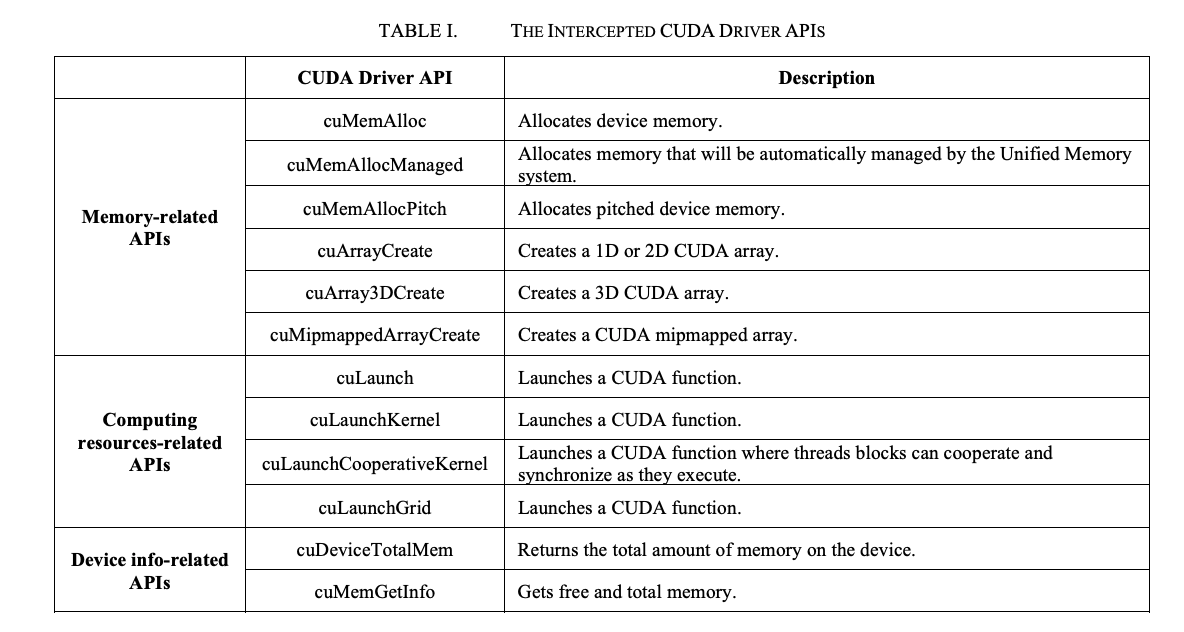
vCUDA 在调用相应 API 时检查:

  • 对于显存,一旦该任务申请显存后占用的显存大小大于 config 中的设置,就报错。
  • 对于计算资源,存在硬隔离和软隔离两种方式
    • 共同点是当任务使用的 GPU SM 利用率超出资源上限,则暂缓下发 API 调用。
    • 不同点是如果有资源空闲,软隔离允许任务超过设置,动态计算资源上限。而硬隔离则不允许超出设置量。

这里对于其具体实现按下不表。

一个令人疑惑的问题是,在 GPU Manager 中,用户的容器是如何能够使用这个动态库的呢?具体有两个问题:

  • 这个库从哪里来?
    • GPU Manager 作为 DaemonSet 会在其 Image 中将我们自定义的库打包进去,然后挂载到 Node 上的一个目录。
  • 容器中的应用是如何感知到的?
    • 这里主要是通过在创建容器的时候,设置 LD_LIBRARY_PATH ,将其指向这个自定义的动态库的地址。

资源监控统计

这部分代码还没有看。

参考资料