在 transformers 中,每个模型都需要三个核心 class:

  • Configuration class
  • Model class
  • Preprocessing class

Config

PretrainedConfig

Base class for all configuration classes

 1
 2
 3
 4
 5
 6
 7
 8
 9
10
11
12
13
14
15
16
17
18
19
20
21
22
class PreTrainedConfig(PushToHubMixin, RotaryEmbeddingConfigMixin):
    
    def __init__(
        self,
        # ...
        # Fine-tuning task arguments
        architectures: Optional[list[str]] = None,
        finetuning_task: Optional[str] = None,
        id2label: Optional[dict[int, str]] = None,
        label2id: Optional[dict[str, int]] = None,
        num_labels: Optional[int] = None,
        # ...
        # Tokenizer kwargs
        tokenizer_class: Optional[str] = None,
        prefix: Optional[str] = None,
        bos_token_id: Optional[int] = None,
        pad_token_id: Optional[int] = None,
        eos_token_id: Optional[int] = None,
        sep_token_id: Optional[int] = None,
        decoder_start_token_id: Optional[int] = None,
        **kwargs,
    )

LlamaConfig

 1
 2
 3
 4
 5
 6
 7
 8
 9
10
11
12
13
14
15
16
17
18
19
20
21
22
23
24
25
26
27
28
29
30
31
32
33
34
35
36
37
38
39
40
41
42
43
44
45
46
47
48
49
50
51
52
53
54
55
56
57
class LlamaConfig(PreTrainedConfig):

    def __init__(
        self,
        vocab_size: Optional[int] = 32000,
        hidden_size: Optional[int] = 4096,
        intermediate_size: Optional[int] = 11008,
        num_hidden_layers: Optional[int] = 32,
        num_attention_heads: Optional[int] = 32,
        num_key_value_heads: Optional[int] = None,
        hidden_act: Optional[str] = "silu",
        max_position_embeddings: Optional[int] = 2048,
        initializer_range: Optional[float] = 0.02,
        rms_norm_eps: Optional[int] = 1e-6,
        use_cache: Optional[bool] = True,
        pad_token_id: Optional[int] = None,
        bos_token_id: Optional[int] = 1,
        eos_token_id: Optional[int] = 2,
        pretraining_tp: Optional[int] = 1,
        tie_word_embeddings: Optional[bool] = False,
        rope_parameters: Optional[RopeParameters | dict[str, RopeParameters]] = None,
        attention_bias: Optional[bool] = False,
        attention_dropout: Optional[float] = 0.0,
        mlp_bias: Optional[bool] = False,
        head_dim: Optional[int] = None,
        **kwargs,
    ):
        self.vocab_size = vocab_size
        self.max_position_embeddings = max_position_embeddings
        self.hidden_size = hidden_size
        self.intermediate_size = intermediate_size
        self.num_hidden_layers = num_hidden_layers
        self.num_attention_heads = num_attention_heads

        # for backward compatibility
        if num_key_value_heads is None:
            num_key_value_heads = num_attention_heads

        self.num_key_value_heads = num_key_value_heads
        self.hidden_act = hidden_act
        self.initializer_range = initializer_range
        self.rms_norm_eps = rms_norm_eps
        self.pretraining_tp = pretraining_tp
        self.use_cache = use_cache
        self.attention_bias = attention_bias
        self.attention_dropout = attention_dropout
        self.mlp_bias = mlp_bias
        self.head_dim = head_dim if head_dim is not None else self.hidden_size // self.num_attention_heads
        self.rope_parameters = rope_parameters

        super().__init__(
            pad_token_id=pad_token_id,
            bos_token_id=bos_token_id,
            eos_token_id=eos_token_id,
            tie_word_embeddings=tie_word_embeddings,
            **kwargs,
        )
 1
 2
 3
 4
 5
 6
 7
 8
 9
10
11
12
13
14
15
16
17
18
19
20
21
22
23
24
25
26
27
28
29
30
31
32
33
34
{
  "architectures": [
    "LlamaForCausalLM"
  ],
  "attention_bias": false,
  "attention_dropout": 0.0,
  "bos_token_id": 128000,
  "eos_token_id": 128001,
  "hidden_act": "silu",
  "hidden_size": 4096,
  "initializer_range": 0.02,
  "intermediate_size": 14336,
  "max_position_embeddings": 131072,
  "mlp_bias": false,
  "model_type": "llama",
  "num_attention_heads": 32,
  "num_hidden_layers": 32,
  "num_key_value_heads": 8,
  "pretraining_tp": 1,
  "rms_norm_eps": 1e-05,
  "rope_scaling": {
    "factor": 8.0,
    "low_freq_factor": 1.0,
    "high_freq_factor": 4.0,
    "original_max_position_embeddings": 8192,
    "rope_type": "llama3"
  },
  "rope_theta": 500000.0,
  "tie_word_embeddings": false,
  "torch_dtype": "bfloat16",
  "transformers_version": "4.43.0.dev0",
  "use_cache": true,
  "vocab_size": 128256
}

ModelOutput

ModelOutput 是所有模型输出的基类。下面是其源码核心部分,可以看到 ModelOutput 其实就是一个有序的字典(OrderedDict)。

 1
 2
 3
 4
 5
 6
 7
 8
 9
10
11
12
13
14
15
16
17
18
19
# src/transformers/utils/generic.py
class ModelOutput(OrderedDict):
    def __init_subclass__(cls) -> None:
        """
        这个方法允许对 ModelOutput 的子类进行定制,使得子类在被创建时能够执行特定的操作或注册到某个系统中。
        """
        ...

    def __init__(self, *args, **kwargs):
        """
        初始化 ModelOutput 类的实例。
        """
        super().__init__(*args, **kwargs)

    def __post_init__(self):
        """
        在初始化 ModelOutput 类的实例之后执行的操作,允许进一步对实例进行处理或设置属性。子类需要用 dataclass 装饰器
        """
        ...

基于 ModelOutput,hf 预先定义了 40 多种不同的 sub-class,这些类是 Hugging Face Transformers 库中用于表示不同类型模型输出的基础类,每个类都提供了特定类型模型输出的结构和信息,以便于在实际任务中对模型输出进行处理和使用。每个 sub-class 都需要用装饰器 @dataclass

CausalLMOutput

CausalLMOutput 是一个基础的输出类,通常在训练阶段或不需要缓存(cache)进行快速解码的推理场景中使用。它包含了模型前向传播后的核心结果:

  • loss: 当你传入 labels(即正确答案)时,模型会计算并返回语言建模的损失值。这是模型训练所必需的。
  • logits: 模型对词汇表中每个词的原始预测分数。在生成文本时,通常会通过 argmax 或采样(sampling)等策略从 logits 中选择下一个词元。
  • hidden_states: (可选) 模型所有层的隐藏状态。这对于模型分析和特征提取很有用。
  • attentions: (可选) 模型所有注意力层的注意力权重。这可以用于理解模型在不同词元上的关注程度。
1
2
3
4
5
6
7
8
# src/transformers/modeling_output.py
@dataclass
class CausalLMOutput(ModelOutput):
    # Base class for causal language model (or autoregressive) outputs. 
    loss: Optional[torch.FloatTensor] = None
    logits: torch.FloatTensor = None
    hidden_states: Optional[Tuple[torch.FloatTensor]] = None
    attentions: Optional[Tuple[torch.FloatTensor]] = None

CausalLMOutputWithPast

CausalLMOutputWithPast 继承了 CausalLMOutput 的所有属性,并额外增加了一个关键属性:

  • past_key_values: 这是它与 CausalLMOutput 最核心的区别。该属性用于存储注意力机制中的键(Key)和值(Value)的状态。在自回归生成(如生成一篇文章)的推理过程中,模型每生成一个新词元,就可以利用之前所有词元的 past_key_values,而无需重新计算它们,从而极大地提升生成速度。这个机制通常被称为 “KV 缓存”。
1
2
3
4
5
6
7
8
9
# src/transformers/modeling_output.py
@dataclass
class CausalLMOutputWithPast(ModelOutput):
    # Base class for causal language model (or autoregressive) outputs. 
    loss: Optional[torch.FloatTensor] = None
    logits: torch.FloatTensor = None
    past_key_values: Optional[Tuple[Tuple[torch.FloatTensor]]] = None
    hidden_states: Optional[Tuple[torch.FloatTensor]] = None
    attentions: Optional[Tuple[torch.FloatTensor]] = None

这里的参数:

  • loss 为 torch.FloatTensor of shape (1,)
  • logits 为 torch.FloatTensor of shape (batch_size, sequence_length, config.vocab_size)

为了保持代码规范,我们需要在模型的 forward 函数中对输出结果进行封装,示例如下:

 1
 2
 3
 4
 5
 6
 7
 8
 9
10
11
12
13
14
15
class MyModel(PretrainedModel):
    def __init__(self):
        self.model = ...

    def forward(self, inputs, labels):
        output = self.model(**inputs)
        hidden_states = ...
        loss = loss_fn(outputs, labels)
        return CausalLMOutputWithPast(
            loss=loss,
            logits=logits,
            past_key_values=outputs.past_key_values,
            hidden_states=outputs.hidden_states,
            attentions=outputs.attentions,
        )

MoEModelOutput

这是 MoE 模型 基础输出 的基类。它代表了 MoE Transformer 模型(不带任何特定任务头)的裸输出。

  • last_hidden_statetorch.FloatTensor,维度是 (batch_size, sequence_length, hidden_size)
    • 这是模型最后一层输出的隐藏状态序列。这是 Transformer 模型最核心的输出。
  • hidden_states: (可选) tuple(torch.FloatTensor)
    • 包含了模型所有层的隐藏状态,以及初始的词嵌入向量。如果你在模型配置中启用了 output_hidden_states=True,这个字段才会被返回。
    • 每一层的输出 shape 为 (batch_size, sequence_length, hidden_size)
  • attentions: (可选) tuple(torch.FloatTensor)
    • 包含了模型所有注意力层的注意力权重。如果你在模型配置中启用了 output_attentions=True,这个字段才会被返回。
    • 每一层的 shape 为 (batch_size, num_heads, sequence_length, sequence_length)
  • router_probs / router_logits: (可选) tuple(torch.FloatTensor)
    • 这是 MoE 模型特有的输出。它包含了每一层 MoE 模块中“路由器”(Router)的输出。路由器决定了每个词元(token)应该被发送到哪个专家(expert)去处理。
    • 这些值对于计算 MoE 模型的“辅助损失”(Auxiliary Loss)至关重要。这个损失函数用来确保所有专家被均匀地使用,避免某些专家过载而另一些专家空闲。
    • (注意:文档中 router_probs 和 router_logits 的描述稍有混淆,但你可以理解为它们都是指路由器的原始输出,用于计算辅助损失。)
1
2
3
4
5
6
@dataclass
class MoEModelOutput(ModelOutput):
    last_hidden_state: Optional[torch.FloatTensor] = None
    hidden_states: Optional[tuple[torch.FloatTensor, ...]] = None
    attentions: Optional[tuple[torch.FloatTensor, ...]] = None
    router_logits: Optional[tuple[torch.FloatTensor]] = None

MoeModelOutputWithPast

这个类继承自 MoEModelOutput 的概念,并额外增加了一个用于 自回归生成(autoregressive generation) 的关键部分。

它包含了 MoEModelOutput 的所有字段,并增加了:

  • past_key_values: (可选) Cache 对象。
    • 这就是我们常说的 KV 缓存。在生成文本时,为了提高效率,模型会缓存已经计算过的 Key 和 Value 向量。这样,在生成下一个词元时,就不需要重新计算前面所有词元的 Key-Value,从而大大加快了生成速度。
    • 只有在调用模型时设置了 use_cache=True,这个字段才会被返回。
1
2
3
4
5
6
7
@dataclass
class MoeModelOutputWithPast(ModelOutput):
    last_hidden_state: Optional[torch.FloatTensor] = None
    past_key_values: Optional[Cache] = None
    hidden_states: Optional[tuple[torch.FloatTensor, ...]] = None
    attentions: Optional[tuple[torch.FloatTensor, ...]] = None
    router_logits: Optional[tuple[torch.FloatTensor]] = None

MoECausalLMOutputWithPast

MoECausalLMOutputWithPast 是最具体的一个类,专门用于 带有因果语言模型头(Causal Language Modeling Head)的 MoE 模型。当你使用像 Mixtral 这样的模型进行文本生成或微调时,你通常会直接接触到这个输出对象。

它包含了 MoeModelOutputWithPast 的所有字段,并增加了针对特定任务的输出:

  • loss: (可选) torch.FloatTensor,维度是 (1,)
    • 语言模型损失。只有当你向模型提供了 labels(即正确答案)时,这个字段才会被计算并返回。它通常是交叉熵损失(Cross-Entropy Loss),用于衡量模型预测的下一个词元与真实词元之间的差距。
  • logitstorch.FloatTensor,维度是 (batch_size, sequence_length, config.vocab_size)
    • 预测分数。这是语言模型头的原始输出,在经过 Softmax 激活函数之前。它为词汇表中的每个词元都提供了一个分数,分数越高的词元,模型认为它越有可能成为下一个词元。
  • aux_loss: (可选) torch.FloatTensor
    • 辅助损失。这就是前面提到的,根据 router_logits 计算出的 MoE 负载均衡损失。在训练过程中,这个损失会与主要的 loss 相加,共同指导模型的优化。
1
2
3
4
5
6
7
8
9
@dataclass
class MoeCausalLMOutputWithPast(ModelOutput):
    loss: Optional[torch.FloatTensor] = None
    aux_loss: Optional[torch.FloatTensor] = None
    logits: Optional[torch.FloatTensor] = None
    past_key_values: Optional[Cache] = None
    hidden_states: Optional[tuple[torch.FloatTensor, ...]] = None
    attentions: Optional[tuple[torch.FloatTensor, ...]] = None
    router_logits: Optional[tuple[torch.FloatTensor]] = None

Seq2SeqModelOutput

1
2
3
4
5
6
@dataclass
class SequenceClassifierOutput(ModelOutput):
    loss: Optional[torch.FloatTensor] = None
    logits: Optional[torch.FloatTensor] = None
    hidden_states: Optional[tuple[torch.FloatTensor, ...]] = None
    attentions: Optional[tuple[torch.FloatTensor, ...]] = None

TokenClassifierOutput

1
2
3
4
5
6
@dataclass
class TokenClassifierOutput(ModelOutput):
    loss: Optional[torch.FloatTensor] = None
    logits: Optional[torch.FloatTensor] = None
    hidden_states: Optional[tuple[torch.FloatTensor, ...]] = None
    attentions: Optional[tuple[torch.FloatTensor, ...]] = None

这里简单介绍以下几种,更多的可以查看官方文档和源码:

  • BaseModelOutput: 该类是许多基本模型输出的基础,包含模型的一般输出,如 logits、hidden_states 等。
  • BaseModelOutputWithNoAttention: 在模型输出中不包含注意力(attention)信息。
  • BaseModelOutputWithPast: 包含过去隐藏状态的模型输出,适用于能够迭代生成文本的模型,例如语言模型。
  • BaseModelOutputWithCrossAttentions: 在模型输出中包含交叉注意力(cross attentions)信息,通常用于特定任务中需要跨注意力的情况,比如机器翻译。
  • BaseModelOutputWithPastAndCrossAttentions: 同时包含过去隐藏状态和交叉注意力的模型输出。
  • MoEModelOutput: 包含混合专家模型(Mixture of Experts)输出的模型。
  • MoECausalLMOutputWithPast: 混合专家语言模型的输出,包括过去隐藏状态。
  • Seq2SeqModelOutput: 序列到序列模型输出的基类,适用于需要生成序列的模型。

Model

PreTrainedModel

PreTrainedModel 是 Hugging Face Transformers 库中定义预训练模型的基类。它继承了 nn.Module,同时混合了几个不同的 mixin 类,如 ModuleUtilsMixinGenerationMixinPushToHubMixin 和 PeftAdapterMixin。这个基类提供了创建和定义预训练模型所需的核心功能和属性。

以下是 PreTrainedModel 中的部分代码:

 1
 2
 3
 4
 5
 6
 7
 8
 9
10
11
12
13
14
15
16
# src/transformers/modeling_utils.py
class PreTrainedModel(nn.Module, ModuleUtilsMixin, GenerationMixin, PushToHubMixin, PeftAdapterMixin):
    # Base class for all models.

    config_class = None
    base_model_prefix = ""
    main_input_name = "input_ids"
    _auto_class = None
    _no_split_modules = None
    _skip_keys_device_placement = None
    _keep_in_fp32_modules = None
    ...

    def __init__(self, config: PretrainedConfig, *inputs, **kwargs):
        super().__init__()
        ...

在这个基类中,我们可以看到一些重要的属性和方法:

  • config_class:指向特定预训练模型类的配置文件,用于定义模型的配置。
  • base_model_prefix:基本模型前缀,在模型的命名中使用,例如在加载预训练模型的权重时使用。
  • main_input_name:指定模型的主要输入名称,通常是 input_ids。
  • _init_weights 方法:用于初始化模型权重的方法。

在这个基类中,大多数属性都被定义为 None 或空字符串,这些属性在具体的预训练模型类中会被重写或填充。接下来我们将看到如何使用 PretrainedModel 类定义 llama 模型。

LlamaPreTrainedModel

1
2
3
4
5
6
7
class LlamaPreTrainedModel(PreTrainedModel):
    config_class = LlamaConfig
    base_model_prefix = "model"
    supports_gradient_checkpointing = True
    _no_split_modules = ["LlamaDecoderLayer"]
    _skip_keys_device_placement = "past_key_values"
    _supports_flash_attn_2 = True

在这个例子中,首先定义了 LlamaPreTrainedModel 类作为 llama 模型的基类,它继承自 PreTrainedModel。在这个基类中,我们指定了一些 llama 模型特有的属性,比如配置类 LlamaConfig、模型前缀 model、支持梯度检查点(gradient checkpointing)、跳过的模块列表 _no_split_modules 等等。

然后,我们基于这个基类分别定义了 LlamaModelLlamaForCausalLM 和 LlamaForSequenceClassification。这些模型的逻辑关系如下图所示:
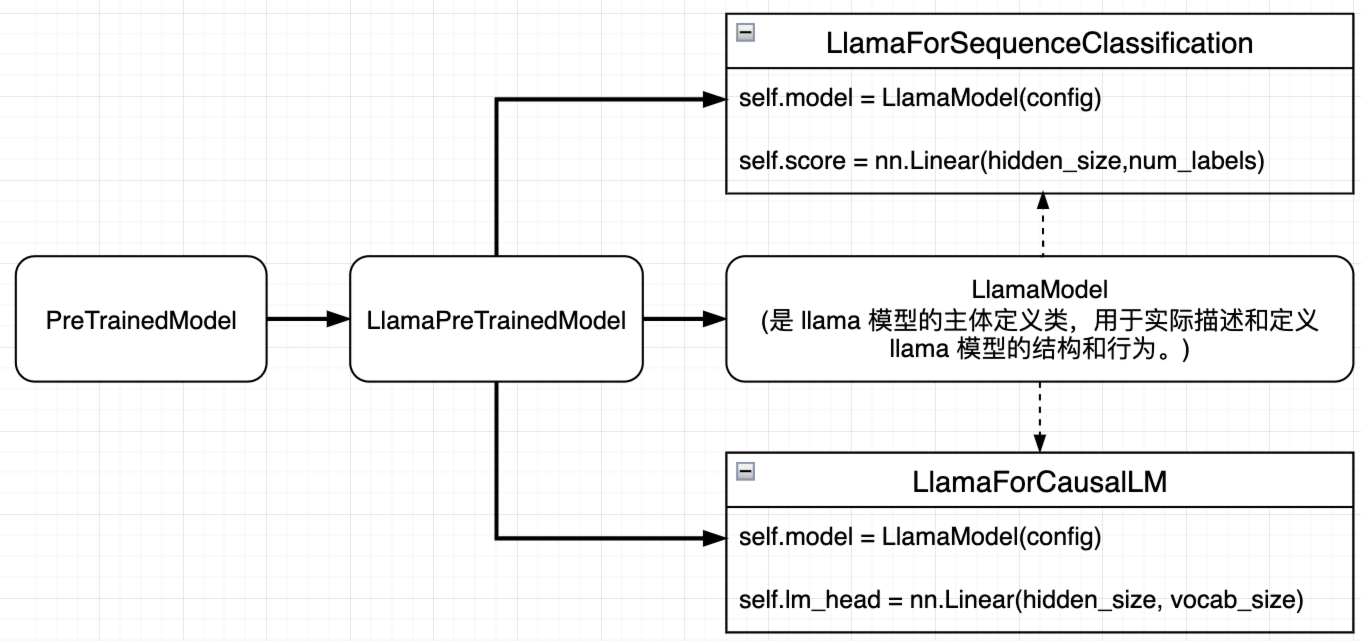
模型逻辑关系
模型逻辑关系

LlamaModel

LlamaModel 是 llama 模型的主体定义类,也就是我们最常见的 pytorch 定义模型的方法、默认的输出格式为 BaseModelOutputWithPast。这里的 LlamaModel 是不带 LMHead 的,输出最后一层的 hidden states。

 1
 2
 3
 4
 5
 6
 7
 8
 9
10
11
12
13
14
15
16
17
18
19
20
21
22
23
24
25
26
27
28
29
30
31
32
33
34
35
class LlamaModel(LlamaPreTrainedModel):

    def __init__(self, config: LlamaConfig):
        super().__init__(config)
        self.padding_idx = config.pad_token_id
        self.vocab_size = config.vocab_size

        self.embed_tokens = nn.Embedding(config.vocab_size, config.hidden_size, self.padding_idx)
        self.layers = nn.ModuleList([LlamaDecoderLayer(config) for _ in range(config.num_hidden_layers)])
        self.norm = LlamaRMSNorm(config.hidden_size, eps=config.rms_norm_eps)
        ...

    def forward(self, ...):
        if inputs_embeds is None:
            inputs_embeds: torch.Tensor = self.embed_tokens(input_ids)
        hidden_states = inputs_embeds
        position_embeddings = self.rotary_emb(hidden_states, position_ids=position_ids)

        for decoder_layer in self.layers[: self.config.num_hidden_layers]:
            hidden_states = decoder_layer(
                hidden_states,
                attention_mask=causal_mask,
                position_embeddings=position_embeddings,
                position_ids=position_ids,
                past_key_values=past_key_values,
                use_cache=use_cache,
                cache_position=cache_position,
                **kwargs,
            )

        hidden_states = self.norm(hidden_states)
        return BaseModelOutputWithPast(
            last_hidden_state=hidden_states,    
            past_key_values=past_key_values,
        )

LlamaForCausalLM

LlamaForCausalLM 适用于生成式语言模型的 llama 模型,可以看到 backbone 就是 LlamaModel,增加了 lm_head 作为分类器,输出长度为词汇表的大小,用来预测下一个单词。输出格式为 CausalLMOutputWithPast

 1
 2
 3
 4
 5
 6
 7
 8
 9
10
11
12
13
14
15
16
17
18
19
20
21
22
23
24
25
26
27
28
29
30
31
32
33
34
35
36
37
38
class LlamaForCausalLM(LlamaPreTrainedModel):
    # 适用于生成式语言模型的 Llama 模型定义

    def __init__(self, config):
        super().__init__(config)
        self.model = LlamaModel(config)
        self.vocab_size = config.vocab_size
        self.lm_head = nn.Linear(config.hidden_size, config.vocab_size, bias=False)
        ...

    def forward(self, ...):
        outputs: BaseModelOutputWithPast = self.model(
            input_ids=input_ids,
            attention_mask=attention_mask,
            position_ids=position_ids,
            past_key_values=past_key_values,
            inputs_embeds=inputs_embeds,
            use_cache=use_cache,
            cache_position=cache_position,
            **kwargs,
        )

        hidden_states = outputs.last_hidden_state
        # Only compute necessary logits, and do not upcast them to float if we are not computing the loss
        slice_indices = slice(-logits_to_keep, None) if isinstance(logits_to_keep, int) else logits_to_keep
        logits = self.lm_head(hidden_states[:, slice_indices, :])

        loss = None
        if labels is not None:
            loss = self.loss_function(logits=logits, labels=labels, vocab_size=self.config.vocab_size, **kwargs)

        return CausalLMOutputWithPast(
            loss=loss,
            logits=logits,
            past_key_values=outputs.past_key_values,
            hidden_states=outputs.hidden_states,
            attentions=outputs.attentions,
        )

LlamaForSequenceClassification

LlamaForSequenceClassification 适用于序列分类任务的 llama 模型,同样把 LlamaModel 作为 backbone,不过增加了 score 作为分类器,输出长度为 label 的数量,用来预测类别。输出格式为 SequenceClassifierOutputWithPast

1
Class LlamaForSequenceClassification (GenericForSequenceClassification, LlamaPreTrainedModel): ...

对应的 GenericForSequenceClassification 实现如下:

 1
 2
 3
 4
 5
 6
 7
 8
 9
10
11
12
13
14
15
16
# src/transformers/modeling_layers.py
class GenericForSequenceClassification:
    # 适用于序列分类任务的 Llama 模型定义

    def __init__(self, config):
        super().__init__(config)
        self.num_labels = config.num_labels
        # Similar to `self.model = AutoModel.from_config(config)` but allows to change the base model name if needed in the child class
        setattr(self, self.base_model_prefix, AutoModel.from_config(config))
        self.score = nn.Linear(config.hidden_size, self.num_labels, bias=False)
        ...

    def forward(self, ...):
        outputs = self.model(...)
        ... # 后处理 outputs,以满足输出格式要求
        return SequenceClassifierOutputWithPast(...)

LlamaForTokenClassification

1
class LlamaForTokenClassification(GenericForTokenClassification, LlamaPreTrainedModel): ...

对应的 GenericForTokenClassification 实现如下

 1
 2
 3
 4
 5
 6
 7
 8
 9
10
11
12
13
14
15
16
17
# src/transformers/modeling_layers.py
class GenericForTokenClassification:
    # 适用于序列分类任务的 Llama 模型定义
    base_model_prefix = "model"

    def __init__(self, config):
        super().__init__(config)
        self.num_labels = config.num_labels
        # Similar to `self.model = AutoModel.from_config(config)` but allows to change the base model name if needed in the child class
        setattr(self, self.base_model_prefix, AutoModel.from_config(config))
        self.score = nn.Linear(config.hidden_size, self.num_labels)
        ...

    def forward(self, ...):
        outputs = self.model(...)
        ... # 后处理 outputs,以满足输出格式要求
        return TokenClassifierOutput(...)

每个子类根据特定的任务或应用场景进行了定制,以满足不同任务的需求。另外可以看到 hf 定义的模型都是由传入的 config 参数定义的,所以不同模型对应不同的配置,这也是为什么我们经常能看到有像 BertConfigGPTConfig 这些预先定义好的类。例如我们可以很方便地通过指定的字符串或者文件获取和修改不同的参数配置:

1
2
3
4
5
6
7
8
config = BertConfig.from_pretrained(
    "bert-base-uncased"
)  # Download configuration from huggingface.co and cache.
config = BertConfig.from_pretrained(
    "./test/saved_model/"
)  # E.g. config (or model) was saved using *save_pretrained('./test/saved_model/')*
config = BertConfig.from_pretrained("./test/saved_model/my_configuration.json")
config = BertConfig.from_pretrained("bert-base-uncased", output_attentions=True, foo=False)

Tokenizer

1
2
3
4
from transformers import AutoModelForCausalLM, AutoTokenizer

model_name = "Qwen/Qwen2.5-0.5B-Instruct"
tokenizer = AutoTokenizer.from_pretrained(model_name)

Tokenize 编码

tokenize 方法可以将一个自然语言字符串,转换成对应的 tokens

1
2
3
4
5
6
7
8
sequence = "Using a Transformer network is simple"
tokens = tokenizer.tokenize(sequence)
print(tokens)
# ['Using', 'Ġa', 'ĠTransformer', 'Ġnetwork', 'Ġis', 'Ġsimple']

ids = tokenizer.convert_tokens_to_ids(tokens)
print(ids)
# [16429, 264, 62379, 3922, 374, 4285]

encode/decode

可以通过 encode() 函数将这两个步骤合并, decode() 函数则对应相反操作。

1
2
3
4
5
6
7
8
sequence = "Using a Transformer network is simple"
sequence_ids = tokenizer.encode(sequence)
print(sequence_ids)
# [16429, 264, 62379, 3922, 374, 4285]

decoded_seq = tokenizer.decode(sequence_ids)
print(decoded_seq)
# Using a Transformer network is simple

Tokenizer 直接处理

一般情况下,会直接通过 tokenizer 处理输入 sequences,如下所示,返回的 output 包括了 input_idsattention_mask

1
2
3
4
5
6
7
from transformers import AutoModelForCausalLM, AutoTokenizer

model_name = "Qwen/Qwen2.5-0.5B-Instruct"
tokenizer = AutoTokenizer.from_pretrained(model_name)
sequence = "Using a Transformer network is simple"
tokenizer_output = tokenizer(sequence)
# {'input_ids': [16429, 264, 62379, 3922, 374, 4285], 'attention_mask': [1, 1, 1, 1, 1, 1]}

tokenizer 有很多可以控制的参数:

  • return_tensors=“pt”,指定返回张量类型,可选"pt"(PyTorch)、“tf”(TensorFlow)、“np”(NumPy),避免手动转换格式
  • return_attention_mask: 返回注意力掩码(1 表示有效 Token0 表示[PAD]),默认True,模型靠它忽略填充部分
1
2
tokenizer_output = tokenizer(sequence, return_tensors="pt")
{'input_ids': tensor(span>, 'attention_mask': tensor(span>, 
 1
 2
 3
 4
 5
 6
 7
 8
 9
10
11
12
13
14
15
print(tokenizer.pad_token_id)
# 151643
texts = [
    "今天天气真好", 
    "自然语言处理真有趣", 
    "Transformer是NLP的核心技术"
]
inputs = tokenizer(
    texts,
    max_length=10,
    padding="max_length",
    truncation=True,
    return_tensors="pt" # 返回PyTorch张量,直接输入模型
)
print(inputs)

输出为,可以看到对应的 input_idsattention_mask

 1
 2
 3
 4
 5
 6
 7
 8
 9
10
11
12
{
    'input_ids': tensor([
        [100644, 104307, 88051, 52801, 151643, 151643, 151643, 151643, 151643, 151643], 
        [ 99795, 102064, 54542, 88051, 103027, 151643, 151643, 151643, 151643, 151643], 
        [ 46358, 20412, 45, 12567, 104867, 99361, 151643, 151643, 151643, 151643]
    ]), 
    'attention_mask': tensor([
        [1, 1, 1, 1, 0, 0, 0, 0, 0, 0], 
        [1, 1, 1, 1, 1, 0, 0, 0, 0, 0], 
        [1, 1, 1, 1, 1, 1, 0, 0, 0, 0]
    ])
}

Apply_chat_template

对于 chat 模型而言,给到模型的数据往往是 chat 格式的,每个消息都包含一个 role 及其 content ,其内容是消息的实际文本:

1
2
3
4
5
6
messages=[
    {"role": "user", "content": "What's the weather today in LA?"},
]

output = tokenizer.apply_chat_template(messages, tokenize=False, add_generation_prompt=True)
print(output)

返回的结果也是一个字符串,其中增加了很多 special tokens

  • <|im_start|> 表示 messages 内一条消息的开始,这里没有写 system messages,执行 apply_chat_template 之后默认返回了 Qwen 的 system message
  • <|im_end|> 表示本消息的结束
  • 接下来是 user message
  • 因为在 apply_chat_template 设置了 add_generation_prompt=True,因此还增加了 <|im_start|>assistant 告诉模型此时应该由模型开始输出
1
2
3
4
5
<|im_start|>system
You are Qwen, created by Alibaba Cloud. You are a helpful assistant.<|im_end|>
<|im_start|>user 
What's the weather today in LA?<|im_end|>
<|im_start|>assistant

实际推理例子

 1
 2
 3
 4
 5
 6
 7
 8
 9
10
11
12
13
14
15
16
17
18
19
20
21
22
23
from transformers import AutoModelForCausalLM, AutoTokenizer

model_name = "Qwen/Qwen2.5-0.5B-Instruct"

# load the tokenizer and the model
tokenizer = AutoTokenizer.from_pretrained(model_name)
model = AutoModelForCausalLM.from_pretrained(
    model_name,
    torch_dtype="auto",
    device_map="auto"
)

messages=[
    {"role": "user", "content": "Hello, how are you?"},
    {"role": "assistant", "content": "I'm doing great. How can I help you today?"},
    {"role": "user", "content": "I'd like to show off how chat templating works!"},
]

text = tokenizer.apply_chat_template(messages, tokenize=False, add_generation_prompt=True)

inputs = tokenizer([text], return_tensors="pt").to(model.device)
generate_ids = model.generate(**inputs)
tokenizer.batch_decode(generate_ids, skip_special_tokens=True, clean_up_tokenization_spaces=False)[0]

Processors

早期 Transformers:

  • NLP:用 Tokenizer
  • Vision:用 FeatureExtractor
  • Audio:用 FeatureExtractor
  • 多模态:用户手动拼接 问题:
  • 接口碎片化
  • 多模态模型难统一
  • pipeline 使用复杂

Transformers 库中的 Processors 定位为多模态统一预处理入口,通常封装了:

  • tokenizer: 文本
  • image processor:图像
  • video processor:视频
  • feature extractor:音频等
 1
 2
 3
 4
 5
 6
 7
 8
 9
10
11
12
13
14
15
16
17
18
19
20
21
┌─────────────────────────────────────────────────────────────────────────────────────────────┐
│                          Transformers 中的 Processor 架构                                    │
├─────────────────────────────────────────────────────────────────────────────────────────────┤
│                                                                                             │
│  传统 NLP 模型:                         多模态 VLM 模型:                                    
│  ─────────────                          ─────────────────                                   │
│                                                                                             │
│  ┌──────────────┐                       ┌─────────────────────────────────────────────────┐│
│  │  Tokenizer   │                       │                 ProcessorMixin                  ││
│  │              │                       │  ┌───────────────┐  ┌──────────────────────┐   ││
│  │  文本 → ids  │                       │  │ImageProcessor │  │     Tokenizer        │   ││
│  └──────────────┘                       │  │               │  │                      │   ││
│        ↓                                │  │  图像 → tensor│  │  文本 → ids          │   ││
│     模型输入                            │  └───────────────┘  └──────────────────────┘   ││
│                                         │           ↓                  ↓                  ││
│                                         │           └──────────┬───────┘                  ││
│                                         │                      ↓                          ││
│                                         │                 统一的模型输入                   ││
│                                         └─────────────────────────────────────────────────┘│
│                                                                                             │
└─────────────────────────────────────────────────────────────────────────────────────────────┘

Processors 本质是多模态预处理的整合器,通常会:

  • 对文本:调用 Tokenizer 进行分词、编码
  • 对图像 / 视频:调用 ImageProcessor/VideoProcessor 进行 resize、归一化等操作
  • 最终将多模态输出整合为模型输入字典(如 input_idspixel_values 等)
 1
 2
 3
 4
 5
 6
 7
 8
 9
10
11
12
13
14
15
16
from transformers import AutoProcessor, AutoModel

processor = AutoProcessor.from_pretrained(
    "openai/clip-vit-base-patch32"
)
url = "https://huggingface.co/datasets/huggingface/documentation-images/resolve/main/pipeline-cat-chonk.jpeg"
image = Image.open(requests.get(url, stream=True).raw)

inputs = processor(
    text=["a cat"],
    images=image,
    return_tensors="pt"
)

print(inputs)
# {'input_ids': tensor([[49406, 320, 2368, 49407]]), 'attention_mask': tensor([[1, 1, 1, 1]]), 'pixel_values': tensor([[[[ 0.1639, 0.2661, 0.3829, ..., -0.5952, -0.3324, 0.1347], [ 0.2077, 0.3099, 0.4413, ..., -0.9456, -0.4784, 0.0325], [ 0.2953, 0.3829, 0.4559, ..., -1.2375, -0.8872, -0.4054], ..., [ 1.3902, 1.4632, 1.5216, ..., 1.2588, 1.2150, 1.1858], [ 1.4924, 1.5362, 1.5362, ..., 1.1566, 1.1420, 1.1128], [ 1.5654, 1.5654, 1.5654, ..., 0.9960, 0.9814, 0.9376]], [[ 0.2589, 0.3790, 0.4991, ..., -0.5665, -0.2363, 0.2289], [ 0.2740, 0.4090, 0.5441, ..., -0.9117, -0.3864, 0.1389], [ 0.3340, 0.4390, 0.5441, ..., -1.1968, -0.8066, -0.3264], ..., [ 1.6247, 1.7297, 1.8047, ..., 1.4446, 1.3995, 1.3695], [ 1.7297, 1.7897, 1.8348, ..., 1.3545, 1.3395, 1.3095], [ 1.7897, 1.8348, 1.8648, ..., 1.1894, 1.1744, 1.1294]], [[ 0.3968, 0.5248, 0.6528, ..., -0.3995, 0.0129, 0.4964], [ 0.4253, 0.5675, 0.6955, ..., -0.7266, -0.1293, 0.4110], [ 0.4821, 0.6101, 0.6955, ..., -1.0110, -0.5275, -0.0298], ..., [ 1.9042, 1.9610, 2.0037, ..., 1.6624, 1.6340, 1.5913], [ 2.0179, 2.0321, 2.0179, ..., 1.5629, 1.5487, 1.5060], [ 2.0890, 2.0606, 2.0464, ..., 1.3638, 1.3638, 1.3211]]]])}

ProcessorMixin 是 HuggingFace Transformers 库中用于多模态模型的核心基类,它的作用是将多个处理器 (如 ImageProcessor 和 Tokenizer)封装成一个统一的接口。

 1
 2
 3
 4
 5
 6
 7
 8
 9
10
11
12
13
14
15
16
17
18
19
20
21
22
23
24
25
26
27
28
29
┌───────────────────────────────────────────────────────────────────────────────────────────────┐
│                           ProcessorMixin 核心功能                                             │
├───────────────────────────────────────────────────────────────────────────────────────────────┤
│                                                                                               │
│  1. 组件注册机制                                                                              │
│  ┌─────────────────────────────────────────────────────────────────────────────────────────┐ │
│  │  attributes = ["image_processor", "tokenizer"]   # 声明包含的子组件                     │ │
│  │  image_processor_class = "AutoImageProcessor"    # 自动加载的类                         │ │
│  │  tokenizer_class = "AutoTokenizer"               # 自动加载的类                         │ │
│  └─────────────────────────────────────────────────────────────────────────────────────────┘ │
│                                                                                               │
│  2. 统一的保存/加载机制                                                                       │
│  ┌─────────────────────────────────────────────────────────────────────────────────────────┐ │
│  │  processor.save_pretrained("path/")              # 保存所有组件                         │ │
│  │  processor = SeedVLProcessor.from_pretrained("path/")  # 加载所有组件                  │ │
│  └─────────────────────────────────────────────────────────────────────────────────────────┘ │
│                                                                                               │
│  3. 属性代理                                                                                  │
│  ┌─────────────────────────────────────────────────────────────────────────────────────────┐ │
│  │  processor.tokenizer         # 访问内部 tokenizer                                       │ │
│  │  processor.image_processor   # 访问内部 image_processor                                 │ │
│  └─────────────────────────────────────────────────────────────────────────────────────────┘ │
│                                                                                               │
│  4. Chat Template 支持                                                                        │
│  ┌─────────────────────────────────────────────────────────────────────────────────────────┐ │
│  │  processor.apply_chat_template(conversation)     # 应用对话模板                         │ │
│  └─────────────────────────────────────────────────────────────────────────────────────────┘ │
│                                                                                               │
└───────────────────────────────────────────────────────────────────────────────────────────────┘

ImageProcessor

专门处理图像数据,核心操作包括:

  • 调整尺寸(resize)、中心裁剪(center crop);
  • 归一化(normalize,基于 ImageNet 均值 / 标准差);
  • 转换为张量(to tensor)。
 1
 2
 3
 4
 5
 6
 7
 8
 9
10
11
12
13
14
from transformers import AutoImageProcessor
from PIL import Image
import requests

# 加载 ViT 的 ImageProcessor
image_processor = AutoImageProcessor.from_pretrained("google/vit-base-patch16-224")

# 处理图像
url = "http://images.cocodataset.org/val2017/000000039769.jpg"
image = Image.open(requests.get(url, stream=True).raw)
inputs = image_processor(images=image, return_tensors="pt")

# 输出:pixel_values(形状 [1, 3, 224, 224])
print(inputs["pixel_values"].shape)

图像处理器继承自 BaseImageProcessor 类,该类提供了 center_crop()normalize()rescale() 函数。图像处理器有两种类型。

每个图像处理器都继承了ImageProcessingMixin类,该类提供了from_pretrained()save_pretrained()方法,用于加载和保存图像处理器。

加载图像处理器有两种方法:使用 AutoImageProcessor 或特定型号的图像处理器。

VideoProcessor

专门处理视频数据,核心逻辑:

  • 采样视频帧(如均匀采样 16 帧);
  • 对每一帧应用 ImageProcessor 的操作;
  • 组合为视频张量(形状 [batch_size, num_frames, channels, height, width])。
 1
 2
 3
 4
 5
 6
 7
 8
 9
10
11
12
13
14
15
16
17
18
19
20
21
22
23
24
25
26
27
from transformers import AutoVideoProcessor
import av
import numpy as np

# 辅助函数:读取视频帧(需安装 pyav:pip install av)
def read_video_frames(video_path, num_frames=16):
    container = av.open(video_path)
    stream = container.streams.video[0]
    frames = []
    for frame in container.decode(stream):
        if len(frames) >= num_frames:
            break
        frames.append(frame.to_rgb().to_ndarray())
    # 补全帧数(不足则重复最后一帧)
    while len(frames) < num_frames:
        frames.append(frames[-1])
    return np.array(frames)  # 形状:(num_frames, height, width, 3)

# 加载 VideoMAE 的 VideoProcessor
video_processor = AutoVideoProcessor.from_pretrained("MCG-NJU/videomae-base")

# 处理视频
video_frames = read_video_frames("example_video.mp4")  # 替换为你的视频路径
inputs = video_processor(videos=video_frames, return_tensors="pt")

# 输出:pixel_values(形状 [1, 16, 3, 224, 224])
print(inputs["pixel_values"].shape)

Auto Classes

在很多情况下,你想要使用的架构可以从你提供给 from_pretrained() 方法的预训练模型的名称或路径中推测出来,AutoClasses 的作用就是为你完成这项工作。

比如,可以直接通过下列的方法加载模型

1
Model = AutoModel. From_pretrained ("google-bert/bert-base-cased")

如果想在 AutoModel 注册一个新模型,需要定义好 NewModelNewModelConfig,然后利用 AutoModelAutoConfigregister 方法注册就可以。

1
2
3
4
from transformers import AutoConfig, AutoModel

AutoConfig.register("new-model", NewModelConfig)
AutoModel.register(NewModelConfig, NewModel)

一般来说,这里的 NewModelConfigPretrainedConfig 的子类,NewModelPretrainedModel 的子类。

AutoConfig

 1
 2
 3
 4
 5
 6
 7
 8
 9
10
11
12
13
14
15
16
17
# src/transformers/models/auto/configuration_auto.py
CONFIG_MAPPING_NAMES = OrderedDict[str, str](
    [
        # Model for Causal LM mapping
        # ...
        ("deepseek_v2", "DeepseekV2Config"),
        ("deepseek_v3", "DeepseekV3Config"),
        ("glm4", "Glm4Config"),
        ("gpt2", "GPT2Config"),
        ("gpt_oss", "GptOssConfig"),
        ("llama", "LlamaConfig"),
        ("mixtral", "MixtralConfig"),
        ("qwen2", "Qwen2Config"),
        ("qwen2_moe", "Qwen2MoeConfig"),
        ("seed_oss", "SeedOssForCausalLM"),
        # ...
    ]

AutoTokenizer

类名 描述 适用任务
AutoModel 加载预训练的基础模型,不包含任何任务特定的头部。 特征提取、嵌入生成、自定义任务等
AutoModelForCausalLM 加载带有因果语言建模头部的模型,适用于生成任务。 文本生成、对话系统、自动补全等
AutoModelForMaskedLM 加载带有掩码语言建模头部的模型,适用于填空任务。 填空任务、句子补全、文本理解等
AutoModelForSeq 2 SeqLM 加载适用于序列到序列任务的模型,带有编码器-解码器架构。 机器翻译、文本摘要、问答系统等
AutoModelForQuestionAnswering 加载适用于问答任务的模型,带有专门的头部用于预测答案的起始和结束位置。 问答系统、信息检索等
AutoModelForTokenClassification 加载用于标注任务(如命名实体识别)的模型。 命名实体识别、词性标注等
AutoModelForSequenceClassification 加载用于序列分类任务的模型,带有分类头部。 文本分类、情感分析等

AutoModelForCausalLM

 1
 2
 3
 4
 5
 6
 7
 8
 9
10
11
12
13
14
15
16
17
18
19
20
# src/transformers/models/auto/modeling_auto.py
MODEL_FOR_CAUSAL_LM_MAPPING_NAMES = OrderedDict(
    [
        # Model for Causal LM mapping
        # ...
        ("deepseek_v2", "DeepseekV2ForCausalLM"),
        ("deepseek_v3", "DeepseekV3ForCausalLM"),
        ("glm4", "Glm4ForCausalLM"),
        ("gpt2", "GPT2LMHeadModel"),
        ("gpt_oss", "GptOssForCausalLM"),
        ("llama", "LlamaForCausalLM"),
        ("mixtral", "MixtralForCausalLM"),
        ("qwen2", "Qwen2ForCausalLM"),
        ("qwen2_moe", "Qwen2MoeForCausalLM"),
        ("qwen3", "Qwen3ForCausalLM"),
        ("qwen3_moe", "Qwen3MoeForCausalLM"),
        ("qwen3_next", "Qwen3NextForCausalLM"),
        ("seed_oss", "SeedOssForCausalLM"),
        # ...
    ]

AutoModelForTokenClassification

参考资料

Linked Mentions
    No backlinks found.