Introduction to eBPF 这篇文章中介绍了基于内核源码开发并加载 eBPF 代码的过程。本文将介绍基于 Go 和对应的库开发 eBPF 程序,文中所有涉及的代码可以在我的 Github 中找到。

选择 eBPF 库

当涉及到选择库和工具来与 eBPF 进行交互时,会让人有所困惑。在选择时,你必须在基于 Python 的 BCC 框架、基于 C 的 libbpf 和一系列基于 Go 的 DropboxCiliumAquaCalico 等库中选择。

在大多数情况下,eBPF 库主要协助实现两个功能:

  • 将 eBPF 程序和 Map 载入内核并执行重定位,通过其文件描述符将 eBPF 程序与正确的 Map 进行关联。
  • 与 eBPF Map 交互,允许对存储在 Map 中的键/值对进行标准的 CRUD 操作。

部分库也可以帮助你将 eBPF 程序附加到一个特定的钩子,尽管对于网络场景下,这可能很容易采用现有的 netlink API 库完成。

当涉及到 eBPF 库的选择时,仍然让人感到困惑(见[1], [2])。事实是每个库都有各自的范围和限制。

  • Calico 在用 bpftool 和 iproute2 实现的 CLI 命令基础上实现了一个 Go 包装器。
  • Aqua 实现了对 libbpf C 库的 Go 包装器。
  • Dropbox 支持一小部分程序,但有一个非常干净和方便的用户API。
  • IO Visor 的 gobpf 是 BCC 框架的 Go 语言绑定,它更注重于跟踪和性能分析。
  • Cilium 和 Cloudflare 维护一个 纯 Go 语言编写的库 (以下简称 “libbpf-go”),它将所有 eBPF 系统调用抽象在一个本地 Go 接口后面。

参考 使用 Go 语言管理和分发 ebpf 程序 可以看到 cilium/ebpf 更加活跃,本文也选择基于 cilium/ebpf 库来开发。cilium/ebpf 纯 Go 程序编写,从而实现了程序最小依赖;与此同时其还提供了 bpf2go 工具,可用来将 eBPF 程序编译成 Go 语言中的一部分,使得交付更加方便,后续如果配合 CO-RE 功能则威力大增。

环境准备

eBPF 程序一般有两部分组成:

  1. 基于 C 语言的 eBPF 程序,最终使用 clang/llvm 编译成 elf 格式的文件,为内核中需要加载的程序;
  2. Go 语言程序用于加载、调试 eBPF 程序,为用户空间的程序,用于配置或者读取 eBPF 程序生成的数据。

前置条件需要安装 clang/llvm 编译器:

1
2
3
4
# 安装 llvm 编译器,至少要求 clang 9.0 版本以上
$ sudo apt update -y
$ sudo apt install -y llvm
$ sudo apt install -y clang

可以从我的 Github 下载代码,目录结构如下:

 1
 2
 3
 4
 5
 6
 7
 8
 9
10
11
12
13
14
15
16
[root@VM-4-27-centos demo]# tree
.
|-- bpf
|   |-- headers
|   |   |-- bpf_core_read.h
|   |   |-- bpf_helper_defs.h
|   |   |-- bpf_helpers.h
|   |   |-- bpf_tracing.h
|   |   |-- update.sh
|   |   `-- vmlinux.h
|   `-- kprobe.c
|-- Dockerfile
|-- go.mod
|-- go.sum
|-- main.go
`-- Makefile

编程规范

BPF 代码

以 kprobe 为例

 1
 2
 3
 4
 5
 6
 7
 8
 9
10
11
12
13
14
15
16
17
18
19
20
21
22
23
24
25
26
27
28
// +build ignore

#include "vmlinux.h"
#include "bpf_helpers.h"

char __license[] SEC("license") = "Dual MIT/GPL";

struct bpf_map_def SEC("maps") kprobe_map = {
    .type = BPF_MAP_TYPE_ARRAY,
    .key_size = sizeof(u32),
    .value_size = sizeof(u64),
    .max_entries = 1,
};

SEC("kprobe/sys_execve")
int kprobe_execve() {
    u32 key = 0;
    u64 initval = 1, *valp;

    valp = bpf_map_lookup_elem(&kprobe_map, &key);
    if (!valp) {
        bpf_map_update_elem(&kprobe_map, &key, &initval, BPF_ANY);
        return 0;
    }
    __sync_fetch_and_add(valp, 1);

    return 0;
}

头文件

libbpf
 1
 2
 3
 4
 5
 6
 7
 8
 9
10
11
12
13
14
15
16
17
#!/usr/bin/env bash

# Version of libbpf to fetch headers from
LIBBPF_VERSION=0.5.0

# The headers we want
prefix=libbpf-"$LIBBPF_VERSION"
headers=(
    "$prefix"/src/bpf_core_read.h
    "$prefix"/src/bpf_helper_defs.h
    "$prefix"/src/bpf_helpers.h
    "$prefix"/src/bpf_tracing.h
)

# Fetch libbpf release and extract the desired headers
curl -sL "https://github.com/libbpf/libbpf/archive/refs/tags/v${LIBBPF_VERSION}.tar.gz" | \
    tar -xz --xform='s#.*/##' "${headers[@]}"
vmlinux.h

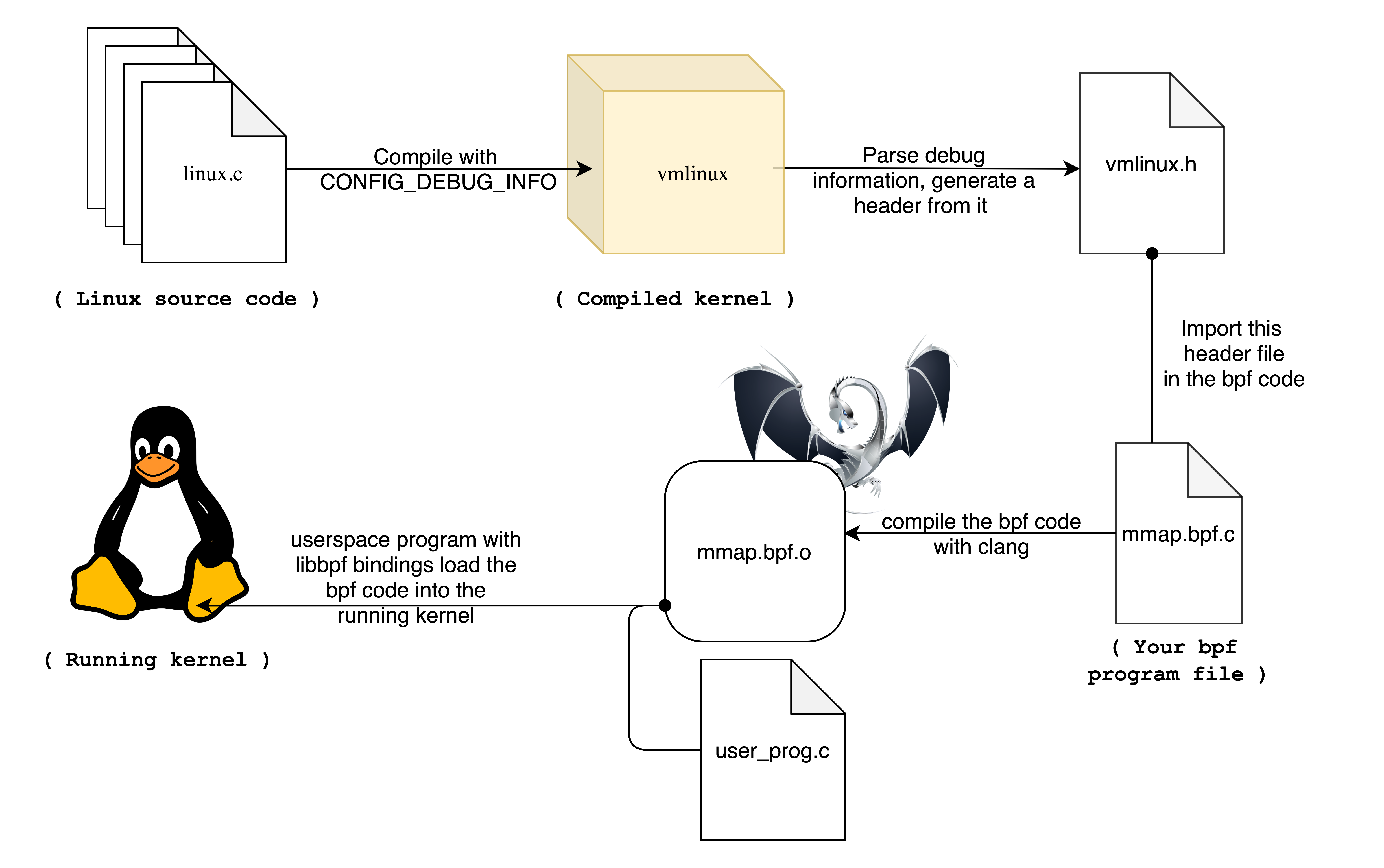
vmlinux.h 是使用工具生成的代码文件。它包含了系统运行 Linux 内核源代码中使用的所有类型定义。当我们编译 Linux 内核时,会输出一个称作 vmlinux 的文件组件,其是一个 ELF 的二进制文件,包含了编译好的可启动内核。vmlinux 文件通常也会被打包在主要的 Linux 发行版中。

内核中的 bpftool 工具其中功能之一就是读取 vmlinux 文件并生成对应的 vmlinux.h 头文件。vmlinux.h 会包含运行内核中所使用的每一个类型定义,因此该文件的比较大。

生成 vmlinux.h 文件的命令如下:

1
$ bpftool btf dump file /sys/kernel/btf/vmlinux format c > vmlinux.h

包含该 vmlinux.h,就意味着我们的程序可以使用内核中使用的所有数据类型定义,因此 BPF 程序在读取相关的内存时,就可以映射成对应的类型结构按照字段进行读取。

例如,Linux 中的 task_struct 结构用于表示进程,如果 BPF 程序需要检查 task_struct 结构的值,那么首先就需要知道该结构的具体类型定义。
vmlinux
vmlinux

由于 vmlinux.h 文件是由当前运行内核生成的,如果你试图将编译好的 eBPF 程序在另一台运行不同内核版本的机器上运行,可能会面临崩溃的窘境。这主要是因为在不同的版本中,对应数据类型的定义可能会在 Linux 源代码中发生变化。

但是,通过使用 libbpf 库提供的功能可以实现 “CO:RE”(一次编译,到处运行)。libbpf 库定义了部分宏(比如 BPF_CORE_READ),其可分析 eBPF 程序试图访问 vmlinux.h 中定义的类型中的哪些字段。如果访问的字段在当前内核定义的结构中发生了移动,宏 / 辅助函数会协助自动找到对应字段。对于可能消失的字段,也提供了对应的辅助函数 bpf_core_field_exists。因此,我们可以使用当前内核中生成的 vmlinux.h 头文件来编译 eBPF 程序,然后在不同的内核上运行它【需要运行的内核也支持 BTF 内核编译选项】。

代码编译

bpf2go

该注解使用 bpf2go 程序将 kprobe.c 文件编译成 bpfdemo_bpfeb.gobpfdemo_bpfel.go 两个文件,分别为 bigendianlittleendian 两种平台的程序。

其中参数中的 BPFDemo 参数为 main.go 文件中函数调用的名称,例如 objs := BPFDemoObjects{}LoadBPFDemoObjects(&objs, nil);

1
2
3
4
5
6
7
// SPDX-License-Identifier: GPL-2.0-only
// Copyright (C) 2021 Authors of Nylon */

//go:generate sh -c "echo Generating for amd64"
//go:generate go run github.com/cilium/ebpf/cmd/bpf2go -cc clang BPFDemo ./bpf/kprobe.c -- -DOUTPUT_SKB -D__TARGET_ARCH_x86 -I./bpf/headers

package main

Makefile

 1
 2
 3
 4
 5
 6
 7
 8
 9
10
11
12
13
14
15
16
17
18
GO := go
GO_BUILD = CGO_ENABLED=0 $(GO) build
GO_GENERATE = $(GO) generate
GO_TAGS ?=
TARGET=BPFDemo
BINDIR ?= /usr/local/bin
VERSION=$(shell git describe --tags --always)

$(TARGET):
	$(GO_GENERATE)
	$(GO_BUILD) $(if $(GO_TAGS),-tags $(GO_TAGS)) \
		-ldflags "-w -s \
		-X 'github.com/SimpCosm/godemo/ebpf/BPFDemo.Version=${VERSION}'"
		
clean:
	rm -f $(TARGET)
	rm -f bpfdemo_bpf*
	rm -rf ./release

执行编译,可以看到生成了对应的 BPF 字节码 bpfdemo_bpfeb.obpfdemo_bpfel.o,还有对应的 go 文件:

 1
 2
 3
 4
 5
 6
 7
 8
 9
10
11
12
13
14
15
[root@VM-4-27-centos demo]# make
go generate
Generating for amd64
Compiled /root/demo/bpfdemo_bpfel.o
Stripped /root/demo/bpfdemo_bpfel.o
Wrote /root/demo/bpfdemo_bpfel.go
Compiled /root/demo/bpfdemo_bpfeb.o
Stripped /root/demo/bpfdemo_bpfeb.o
Wrote /root/demo/bpfdemo_bpfeb.go
CGO_ENABLED=0 go build  \
	-ldflags "-w -s \
	-X 'github.com/SimpCosm/godemo/ebpf/BPFDemo.Version='"
[root@VM-4-27-centos demo]# ls
Dockerfile  bpf               bpfdemo_bpfeb.o   bpfdemo_bpfel.o  go.mod  main.go        main_arm64.go
Makefile    bpfdemo_bpfeb.go  bpfdemo_bpfel.go  demo             go.sum  main_amd64.go

加载代码

在我们编写的 Go 代码中,首先需要将编译好的 eBPF 代码加载进内核,调用的是 LoadBPFDemoObjects

1
2
3
4
5
6
	// Load pre-compiled programs and maps into the kernel.
	objs := BPFDemoObjects{}
	if err := LoadBPFDemoObjects(&objs, nil); err != nil {
		log.Fatalf("loading objects: %v", err)
	}
	defer objs.Close()

这里的 LoadBPFDemoObjectsBPFDemoObjects 都来自 bpf2go 自动生成的代码。

bpfdemo_bpfeb.go 为例,可以看到生成了很多辅助函数和结构体,其中:

  • BPFDemoObjects 包括 BPF 程序和 BPF Map
  • LoadBPFDemoObjects 会调用 LoadBPFDemo 将编译好的 ELF 格式的 BPF 代码加载进内存,然后调用 LoadAndAssign 实际调用 BPF 系统调用 load BPF 程序到内核。
 1
 2
 3
 4
 5
 6
 7
 8
 9
10
11
12
13
14
15
16
17
18
19
20
21
22
23
24
25
26
27
28
29
30
31
32
33
34
35
36
37
38
39
// BPFDemoMaps contains all maps after they have been loaded into the kernel.
//
// It can be passed to LoadBPFDemoObjects or ebpf.CollectionSpec.LoadAndAssign.
type BPFDemoMaps struct {
        KprobeMap *ebpf.Map `ebpf:"kprobe_map"`
}

// BPFDemoPrograms contains all programs after they have been loaded into the kernel.
//
// It can be passed to LoadBPFDemoObjects or ebpf.CollectionSpec.LoadAndAssign.
type BPFDemoPrograms struct {
        KprobeExecve *ebpf.Program `ebpf:"kprobe_execve"`
}

// BPFDemoObjects contains all objects after they have been loaded into the kernel.
//
// It can be passed to LoadBPFDemoObjects or ebpf.CollectionSpec.LoadAndAssign.
type BPFDemoObjects struct {
        BPFDemoPrograms
        BPFDemoMaps
}

// LoadBPFDemoObjects loads BPFDemo and converts it into a struct.
//
// The following types are suitable as obj argument:
//
//     *BPFDemoObjects
//     *BPFDemoPrograms
//     *BPFDemoMaps
//
// See ebpf.CollectionSpec.LoadAndAssign documentation for details.
func LoadBPFDemoObjects(obj interface{}, opts *ebpf.CollectionOptions) error {
        spec, err := LoadBPFDemo()
        if err != nil {
                return err
        }

        return spec.LoadAndAssign(obj, opts)
}

实际查看 LoadAndAssign 可以看到它会加载 BPF Program 和 BPF Map 到内核

 1
 2
 3
 4
 5
 6
 7
 8
 9
10
11
12
13
14
15
16
17
18
19
20
21
22
23
24
25
26
27
28
29
// LoadAndAssign loads Maps and Programs into the kernel and assigns them
// to a struct.
//    struct {
//        Foo     *ebpf.Program `ebpf:"xdp_foo"`
//        Bar     *ebpf.Map     `ebpf:"bar_map"`
//        Ignored int
//    }
func (cs *CollectionSpec) LoadAndAssign(to interface{}, opts *CollectionOptions) error {
	loader := newCollectionLoader(cs, opts)
	defer loader.cleanup()

	// Support assigning Programs and Maps, lazy-loading the required objects.
	assignedMaps := make(map[string]bool)
	getValue := func(typ reflect.Type, name string) (interface{}, error) {
		switch typ {

		case reflect.TypeOf((*Program)(nil)):
			return loader.loadProgram(name)

		case reflect.TypeOf((*Map)(nil)):
			assignedMaps[name] = true
			return loader.loadMap(name)

		default:
			return nil, fmt.Errorf("unsupported type %s", typ)
		}
	}
  //...
}

这里的 loadProgram 会调用 newProgramWithOptions,处理很多与 BTF 等其他内容后,最终调用 sys.ProgLoad(attr)

1
2
3
4
5
6
func newProgramWithOptions(spec *ProgramSpec, opts ProgramOptions, handles *handleCache) (*Program, error) {
    // ...
    fd, err := sys.ProgLoad(attr)
  
    // ...
}

此即调用了 BPF 的系统调用:

1
2
3
4
5
6
7
func ProgLoad(attr *ProgLoadAttr) (*FD, error) {
	fd, err := BPF(BPF_PROG_LOAD, unsafe.Pointer(attr), unsafe.Sizeof(*attr))
	if err != nil {
		return nil, err
	}
	return NewFD(int(fd))
}

加载 map 也是类似,最终调用了 sys.MapCreate

1
2
3
4
5
6
7
func MapCreate(attr *MapCreateAttr) (*FD, error) {
	fd, err := BPF(BPF_MAP_CREATE, unsafe.Pointer(attr), unsafe.Sizeof(*attr))
	if err != nil {
		return nil, err
	}
	return NewFD(int(fd))
}

Kprobe 处理

kprobe可以对任何内核函数进行插桩,可以实时在生产环境中启用,不需要重启系统,也不需要以特殊方式重启内核。 现在有以下三种接口可以访问kprobes.

  • kprobe API: 如 register_kprobe() 等,在 这篇文章中 介绍了其用法
  • 基于Frace的,通过 /sys/kernel/debug/tracing/kprobe_events: 通过向这个文件写入字符串,可以配置开启和停止kprobes,在 这篇文章中 介绍了其用法
  • perf_event_open(): 与 perf 工具所使用的一样,现在BPF跟踪工具也开始使用这些函数

对应到 main.go 中,在 LoadBPFDemoObjects之后,我们还调用了 link.Kprobe

1
2
3
4
5
6
7
8
9
	// Open a Kprobe at the entry point of the kernel function and attach the
	// pre-compiled program. Each time the kernel function enters, the program
	// will increment the execution counter by 1. The read loop below polls this
	// map value once per second.
	kp, err := link.Kprobe(fn, objs.KprobeExecve)
	if err != nil {
		log.Fatalf("opening kprobe: %s", err)
	}
	defer kp.Close()

创建 kprobe类型的 perf event

  • symbol 是追踪的内核函数
  • prog 是编译的 eBPF 程序
 1
 2
 3
 4
 5
 6
 7
 8
 9
10
11
12
13
14
func Kprobe(symbol string, prog *ebpf.Program, opts *KprobeOptions) (Link, error) {
   k, err := kprobe(symbol, prog, opts, false)
   if err != nil {
      return nil, err
   }

   lnk, err := attachPerfEvent(k, prog)
   if err != nil {
      k.Close()
      return nil, err
   }

   return lnk, nil
}

这里创建了一个 kprobe 类型的 Perf Event,传入的追踪地址是 symbol

 1
 2
 3
 4
 5
 6
 7
 8
 9
10
11
12
13
14
15
16
17
18
19
20
21
22
23
24
25
26
// kprobe opens a perf event on the given symbol and attaches prog to it.
// If ret is true, create a kretprobe.
func kprobe(symbol string, prog *ebpf.Program, opts *KprobeOptions, ret bool) (*perfEvent, error) {
  // ...
  
	args := probeArgs{
		pid:    perfAllThreads,
		symbol: platformPrefix(symbol),
		ret:    ret,
	}

	// Use kprobe PMU if the kernel has it available.
	tp, err := pmuKprobe(args)
	if err == nil {
		return tp, nil
	}
  
  // ... 
  
	// Use tracefs if kprobe PMU is missing.
	args.symbol = platformPrefix(symbol)
	tp, err = tracefsKprobe(args)
  // ...

	return tp, nil
}

最终调用了 PerfEventOpen 来开启一个 perf event,这个系统调用可以参考 这里

 1
 2
 3
 4
 5
 6
 7
 8
 9
10
11
12
13
14
15
16
17
18
19
20
21
22
23
24
25
26
27
28
29
30
31
32
33
34
35
36
// pmuProbe opens a perf event based on a Performance Monitoring Unit.
//
// Requires at least a 4.17 kernel.
// e12f03d7031a "perf/core: Implement the 'perf_kprobe' PMU"
// 33ea4b24277b "perf/core: Implement the 'perf_uprobe' PMU"
//
// Returns ErrNotSupported if the kernel doesn't support perf_[k,u]probe PMU
func pmuProbe(typ probeType, args probeArgs) (*perfEvent, error) {
  // ...
	switch typ {
	case kprobeType:
		// Create a pointer to a NUL-terminated string for the kernel.
		sp, err = unsafeStringPtr(args.symbol)

		attr = unix.PerfEventAttr{
			Type:   uint32(et),          // PMU event type read from sysfs
			Ext1:   uint64(uintptr(sp)), // Kernel symbol to trace
			Config: config,              // Retprobe flag
		}
	case uprobeType:
    // ...
	}
	
	rawFd, err := unix.PerfEventOpen(&attr, args.pid, 0, -1, unix.PERF_FLAG_FD_CLOEXEC)
	fd, err := sys.NewFD(rawFd)
  
  // ...
	// Kernel has perf_[k,u]probe PMU available, initialize perf event.
	return &perfEvent{
		typ:    typ.PerfEventType(args.ret),
		name:   args.symbol,
		pmuID:  et,
		cookie: args.cookie,
		fd:     fd,
	}, nil
}

挂载 eBPF 程序到 perf event

通过 perf_event 的 ioctl 调用把 BPF 程序 attach 到 kprobe event

  • PERF_EVENT_IOC_SET_BPF,表示允许 attach BPF 程序到 kprobe event 上,其中 ioctl 设置的第三个参数代表 bpf 系统调用的 fd。
  • PERF_EVENT_IOC_ENABLE,表示使能 event。
1
2
ioctl(perf_event_fd, PERF_EVENT_IOC_SET_BPF, bpf_prog_fd)
ioctl(perf_event_fd, PERF_EVENT_IOC_ENABLE, 0)

attachPerfEvent 通过 perf_event 的 ioctl 调用把 BPF 程序 attach 到 kprobe event

 1
 2
 3
 4
 5
 6
 7
 8
 9
10
11
12
13
14
15
16
17
18
19
20
21
22
23
24
25
26
27
28
29
30
31
32
33
34
35
36
37
38
39
// attach the given eBPF prog to the perf event stored in pe.
// pe must contain a valid perf event fd.
// prog's type must match the program type stored in pe.
func attachPerfEvent(pe *perfEvent, prog *ebpf.Program) (Link, error) {
	if prog == nil {
		return nil, errors.New("cannot attach a nil program")
	}
	if prog.FD() < 0 {
		return nil, fmt.Errorf("invalid program: %w", sys.ErrClosedFd)
	}

	switch pe.typ {
	case kprobeEvent, kretprobeEvent, uprobeEvent, uretprobeEvent:
		if t := prog.Type(); t != ebpf.Kprobe {
			return nil, fmt.Errorf("invalid program type (expected %s): %s", ebpf.Kprobe, t)
		}
	case tracepointEvent:
		if t := prog.Type(); t != ebpf.TracePoint {
			return nil, fmt.Errorf("invalid program type (expected %s): %s", ebpf.TracePoint, t)
		}
	default:
		return nil, fmt.Errorf("unknown perf event type: %d", pe.typ)
	}

	if err := haveBPFLinkPerfEvent(); err == nil {
		lnk, err := attachPerfEventLink(pe, prog)
		if err != nil {
			return nil, err
		}
		return lnk, nil
	}

	lnk, err := attachPerfEventIoctl(pe, prog)
	if err != nil {
		return nil, err
	}

	return lnk, nil
}

通过 ioctl 挂载 BPF 程序:

 1
 2
 3
 4
 5
 6
 7
 8
 9
10
11
12
13
14
15
16
17
18
19
20
21
22
func attachPerfEventIoctl(pe *perfEvent, prog *ebpf.Program) (*perfEventIoctl, error) {
	if pe.cookie != 0 {
		return nil, fmt.Errorf("cookies are not supported: %w", ErrNotSupported)
	}

	// Assign the eBPF program to the perf event.
	err := unix.IoctlSetInt(pe.fd.Int(), unix.PERF_EVENT_IOC_SET_BPF, prog.FD())
	if err != nil {
		return nil, fmt.Errorf("setting perf event bpf program: %w", err)
	}

	// PERF_EVENT_IOC_ENABLE and _DISABLE ignore their given values.
	if err := unix.IoctlSetInt(pe.fd.Int(), unix.PERF_EVENT_IOC_ENABLE, 0); err != nil {
		return nil, fmt.Errorf("enable perf event: %s", err)
	}

	pi := &perfEventIoctl{pe}

	// Close the perf event when its reference is lost to avoid leaking system resources.
	runtime.SetFinalizer(pi, (*perfEventIoctl).Close)
	return pi, nil
}

查看 Map 信息

定期查看 eBPF map 的更新:

 1
 2
 3
 4
 5
 6
 7
 8
 9
10
11
12
13
	// Read loop reporting the total amount of times the kernel
	// function was entered, once per second.
	ticker := time.NewTicker(1 * time.Second)

	log.Println("Waiting for events..")

	for range ticker.C {
		var value uint64
		if err := objs.KprobeMap.Lookup(mapKey, &value); err != nil {
			log.Fatalf("reading map: %v", err)
		}
		log.Printf("%s called %d times\n", fn, value)
	}

容器镜像

 1
 2
 3
 4
 5
 6
 7
 8
 9
10
11
12
13
14
15
16
FROM ubuntu:20.04
RUN apt update -y -q
RUN DEBIAN_FRONTEND=noninteractive apt-get install --no-install-recommends -y -q curl build-essential ca-certificates
RUN curl -s https://storage.googleapis.com/golang/go1.16.3.linux-amd64.tar.gz| tar -v -C /usr/local -xz
ENV PATH $PATH:/usr/local/go/bin
RUN apt install -y wget gnupg2
RUN printf "deb http://apt.llvm.org/xenial/ llvm-toolchain-xenial-12 main" | tee /etc/apt/sources.list.d/llvm-toolchain-xenial-12.list
RUN wget -O - https://apt.llvm.org/llvm-snapshot.gpg.key | apt-key add -
RUN apt -y update
RUN apt install -y llvm clang git
WORKDIR /ebpf
COPY . .
RUN make
RUN chmod a+x /ebpf
ENTRYPOINT ["./ebpf"]
CMD ["./ebpf"]

参考资料